Server-Side Tracking: The Complete Guide for 2026, Written From Live Accounts
Your ad platforms are quietly losing conversions in the browser, and your reports have stopped agreeing. Server-side tracking fixes part of that, not all of it. Here is how it works, what it costs, and when it is worth doing.
Key takeaways
- Server-side tracking moves the job of sending data to ad and analytics platforms from the visitor’s browser to a server you control, usually on a first-party subdomain.
- It recovers signal lost to ad blockers, short cookie lifetimes and flaky browser scripts, but it does not bring back data from people who declined consent.
- Server-side GTM is the most common route: a web container sends one clean stream to your tagging server, which then forwards events to GA4, Meta, Google Ads and TikTok.
- Hosting cost scales with traffic and request volume. For most small and mid-sized sites it is modest, but maintenance and QA time is the real cost.
- Fix your client-side basics first. Server-side tracking amplifies a clean setup and faithfully forwards a messy one.
01What server-side tracking actually is
Most founders hear about server-side tracking from an agency pitch or a panicked Slack message after a Meta update. It gets described as a magic fix for disappearing conversions. It is not magic, but it is one of the most useful changes you can make to a tracking stack that has grown up in the browser over the last decade.
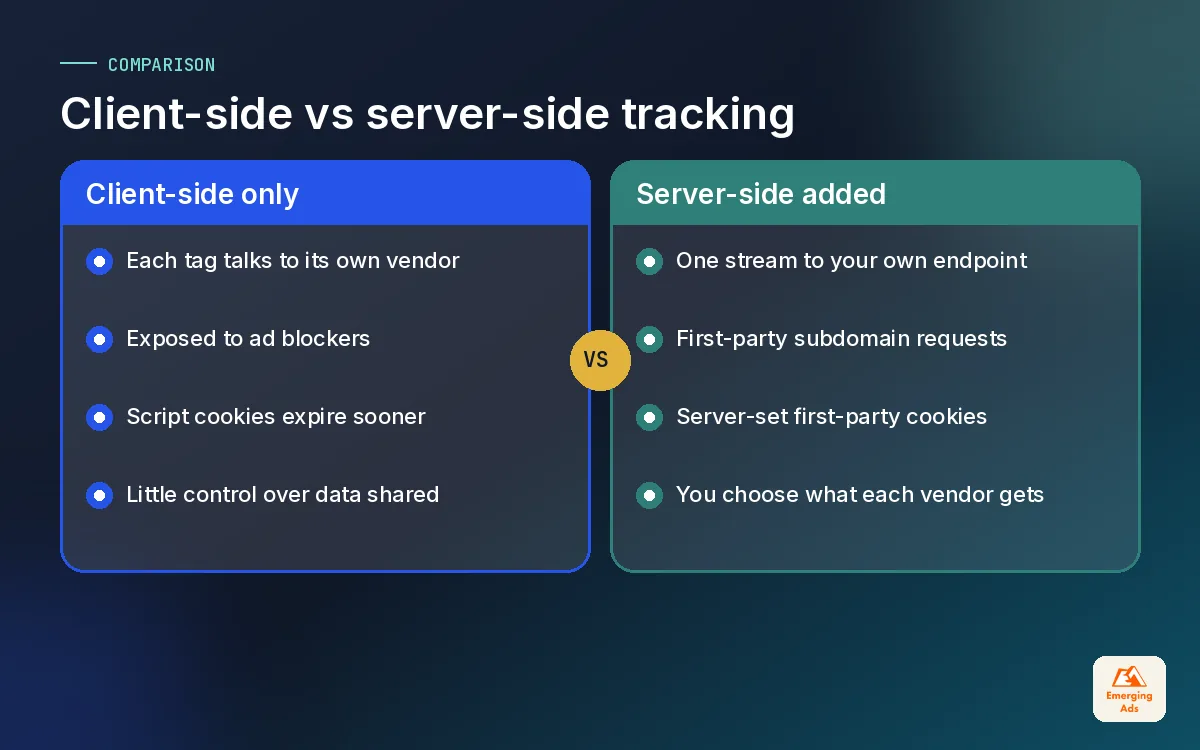
Here is the plain version. In a traditional setup, every tag on your site (GA4, the Meta Pixel, Google Ads, TikTok, LinkedIn) runs as JavaScript in the visitor’s browser and sends data straight to each vendor. With server-side tracking, the browser sends one stream of events to a server you control. That server then decides what to forward, in what format, to which platform. The visitor’s browser does far less work, and you get a checkpoint in the middle where you can clean, enrich and filter data before it leaves.
We set this up for ecommerce stores, lead-gen businesses and SaaS firms most weeks. The pattern that brings people to us is almost always the same: Shopify or the CRM says one number, GA4 says another, Meta says a third, and nobody trusts any of them. Server-side tracking is often part of the answer. It is rarely the whole answer.
Client-side vs server-side in one sentence each
- Client-side: each vendor’s script runs in the browser and talks to its own servers directly, so every blocker, privacy setting and slow connection affects every tag separately.
- Server-side: the browser talks to your endpoint once, and your server talks to the vendors, so you control the data, the cookies and the timing.
02Why client-side tracking is leaking on your account
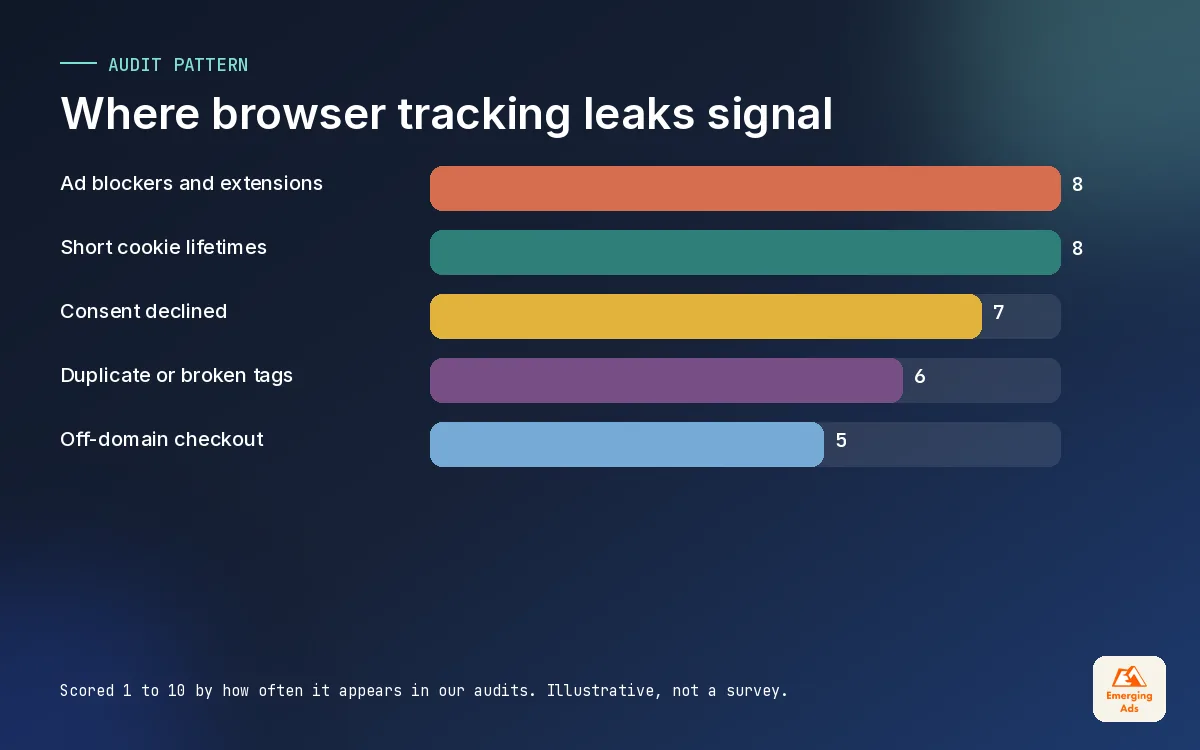
Browser tracking was built for a web that no longer exists. Three forces are chipping away at it, and on the accounts we manage we see all three at once.
1. Ad blockers and privacy extensions
Many blockers work from lists of known tracking domains and script names. If a request goes to a well-known analytics or ad domain, it gets stopped. How much traffic this affects varies widely by audience. A tech-savvy B2B audience on desktop tends to block far more than a mobile shopper browsing from a social app. We treat any figure you read online with caution and measure it per site instead.
2. Shorter cookie lifetimes
Safari’s Intelligent Tracking Prevention limits the lifetime of cookies set by JavaScript, often to 7 days and shorter in some cases. That means a visitor who clicks an ad on Monday and buys the following Wednesday may look like a brand-new user. The conversion either goes unattributed or gets credited to the wrong channel. For businesses with longer consideration windows, like furniture, clinics or B2B software, this quietly distorts every report.
3. Consent choices
In the UK, EU and a growing number of other markets, visitors can decline tracking cookies. That is their right, and a good setup respects it. Consent is the leak that server-side tracking does not fix, and we will come back to that because it is where a lot of vendors oversell.
Add in page speed issues, scripts that fail on slow mobile connections, and checkout pages on other domains, and it is easy to see why your conversion tracking setup reports fewer sales than your backend.
03How server-side GTM works, step by step
There are several ways to do server-side tracking, but server-side Google Tag Manager is the one we use most, because it slots into setups that already run on GTM. If you have read our Google Tag Manager guide, the concepts will feel familiar: containers, tags, triggers and variables. The difference is where the container lives.
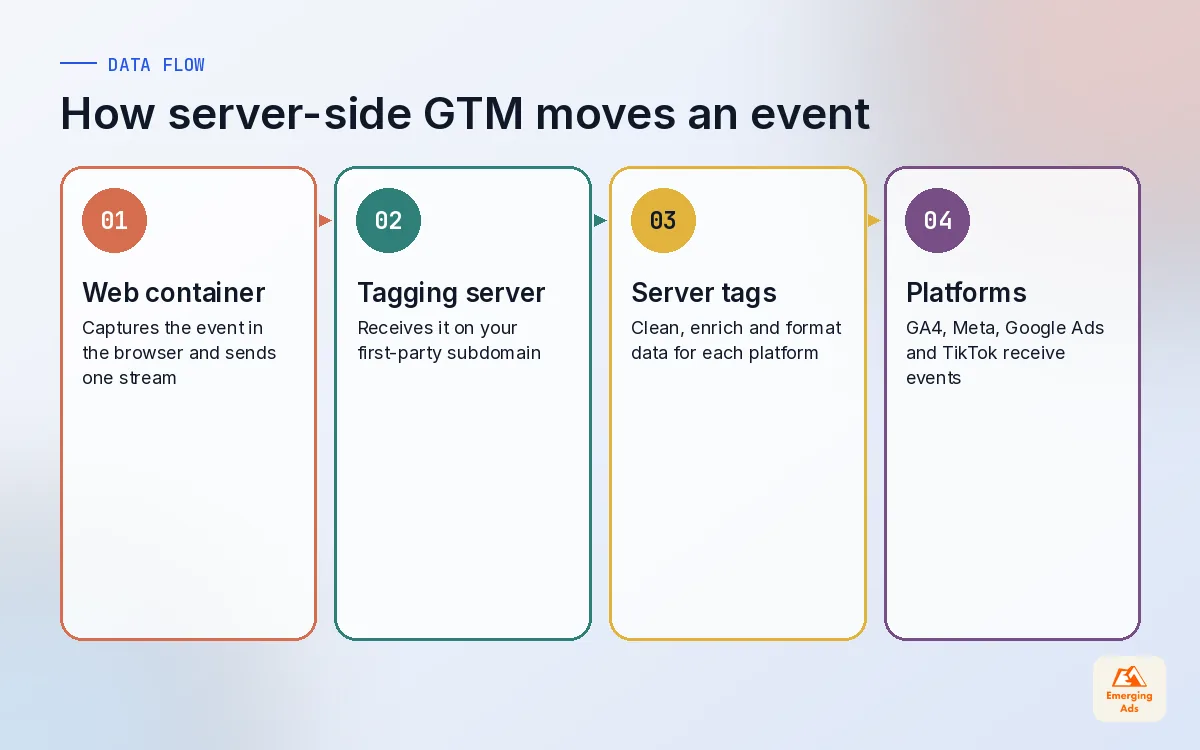
- The web container collects. Your normal GTM web container still runs in the browser, but instead of loading five vendor tags it sends events (page_view, add_to_cart, purchase, generate_lead) to your tagging server, usually through the GA4 tag pointed at your own endpoint.
- The tagging server receives. A server container runs on a cloud endpoint, for example Google Cloud Run or a managed host such as Stape. A client inside the container reads each incoming request and turns it into an event object.
- Server tags forward. Tags in the server container send that event on to GA4, the Meta Conversions API, Google Ads, TikTok Events API and others, each in the format that platform expects.
- You transform on the way. Between receiving and forwarding, you can strip parameters you do not want to share, add values from your own systems, and set first-party cookies from your domain.
Why the first-party subdomain matters
The tagging server should sit on a subdomain of your own site, something like data.yourbrand.com. Requests then go to your domain rather than a well-known vendor domain, and cookies can be set by the server in a first-party context. This is the piece that improves cookie durability and reduces blocking. A tagging server on a generic cloud URL misses most of the benefit, and we still find setups like that when we inherit accounts.
| Layer | Where it runs | What it does |
|---|---|---|
| Web GTM container | Visitor’s browser | Captures events and sends one stream to your endpoint |
| Tagging server | Your cloud endpoint on a first-party subdomain | Receives requests, sets first-party cookies |
| Server clients | Inside the server container | Turn raw requests into event data |
| Server tags | Inside the server container | Forward events to GA4, Meta, Google Ads, TikTok |
| Vendor APIs | Platform side | Receive, match and report conversions |
The build itself is not the hard part. Getting the web container clean before the move is. If your browser-side container has grown into a maze of duplicate tags, a proper Google Tag Manager setup and tidy-up is usually step one.
04Which platforms benefit most from server-side tracking
Not every destination gains the same amount. On the accounts we manage, the biggest improvements come from the ad platforms that optimise bidding on conversion signal. Better signal means the algorithm learns from more of your real customers.
| Destination | Server-side route | What you tend to gain |
|---|---|---|
| Meta | Conversions API, paired with the Pixel and deduplicated with event_id | More matched conversions and better optimisation signal |
| Google Ads | Server-side conversion tag plus enhanced conversions with hashed first-party data | Steadier conversion counts and better click matching |
| TikTok | Events API alongside the TikTok Pixel | More complete event data for optimisation |
| GA4 | GA4 client and tag in the server container | Less blocking, cleaner parameters, first-party cookies |
| Conversions API via server container or partner | Better B2B lead attribution |
Meta is usually the headline. A properly deduplicated Pixel plus Conversions API setup is now standard practice, and we cover it in detail in our companion guide. If you only want that part, our Meta Pixel and CAPI tracking setup service handles it end to end.
For Google, the gain comes from combining the server-side tag with enhanced conversions, which send hashed (SHA-256) first-party data such as email so Google can match more conversions to ad clicks. If you run Google Ads campaigns with smart bidding, that signal feeds straight into how the system values each click. TikTok advertisers get similar gains from the Events API, which matters on TikTok ad accounts where browser signal is often thin.
05Server-side tracking is not a consent loophole
This is the section we wish more vendors wrote. Some sales pitches imply that because data flows through your server, the visitor’s cookie choices no longer apply. That is wrong, and it is a legal risk you carry, not the vendor.
Moving tags to a server changes how data travels. It does not change whether you are allowed to collect it. If a visitor declines marketing cookies, your server should not forward their data to Meta or TikTok for advertising. Google Consent Mode v2, which added the ad_user_data and ad_personalization signals and became required for advertisers using Google ads features with EEA users from March 2024, still needs to be passed correctly through the server container.
Your responsibilities in a server-side setup
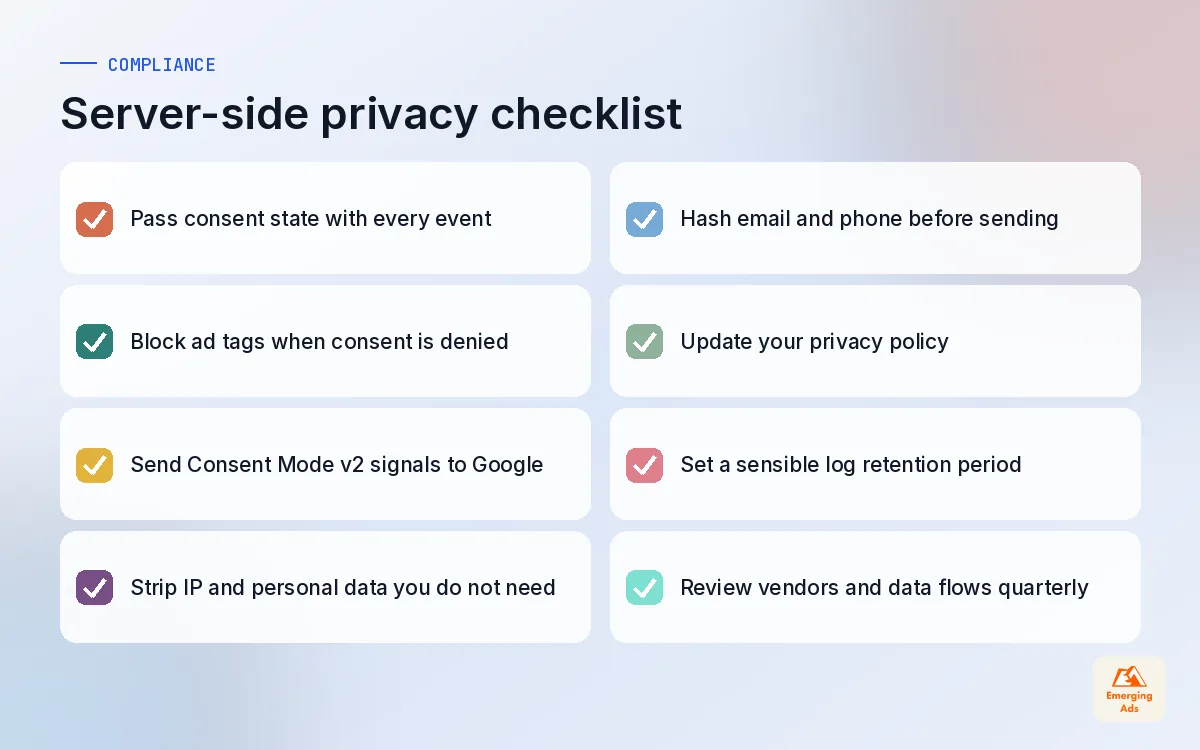
- Pass consent state from the browser to the server with every event, and make server tags respect it.
- Minimise data. Strip IP addresses, full URLs with personal data in query strings, and anything the destination does not need.
- Hash personal data such as email and phone before sending it to ad platforms that expect hashed values.
- Update your privacy policy to reflect that a server you control processes events and which vendors receive them.
- Keep logs sensible. Cloud hosting can log requests by default, so decide what you store and for how long.
Done properly, server-side tracking actually gives you more privacy control than browser tags, because nothing reaches a vendor that you have not explicitly chosen to send. That is the honest selling point, and it is a good one.
Server-side tracking should make you more careful with data, not less. If it feels like a way around consent, something is wrong.
06Hosting options and what drives the cost
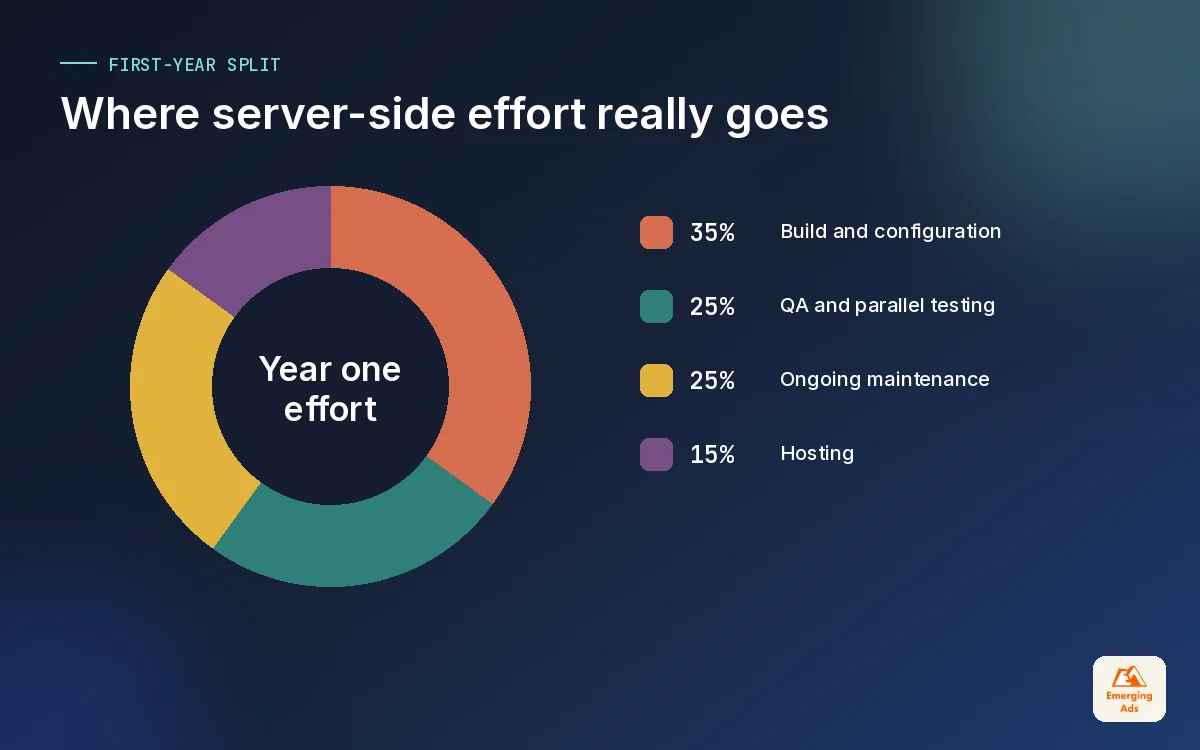
Clients always ask what server-side tracking costs. The honest answer is that hosting is usually the smaller part. The bigger cost is the time to build, test and maintain it well.
The two main hosting routes
Self-managed cloud. You run the tagging server on Google Cloud Run (or another cloud) in your own account. You get full control and pay the cloud provider directly, but someone has to handle scaling settings, updates, monitoring and billing alerts.
Managed hosting. Providers such as Stape run the server for you and add conveniences like custom loaders and ready-made integrations. You pay a subscription, usually tiered by request volume, and hand over most of the infrastructure work.
| Cost driver | Why it matters | How to keep it sane |
|---|---|---|
| Request volume | Every event is a request, so busy sites pay more | Send only events you actually use |
| Number of server instances | More instances mean more resilience and more cost | Size for your real traffic peaks |
| Logging | Verbose request logs can add storage cost | Reduce log levels once stable |
| Destinations | Each platform adds build and QA time | Start with the platforms that drive spend |
| Maintenance | Templates, APIs and consent rules change | Book a quarterly review into the calendar |
For a typical small or mid-sized store or lead-gen site, hosting sits at a level that is easy to justify against ad spend. For very high-traffic publishers or apps, it needs proper sizing. We always estimate request volume from existing GA4 data before recommending a route. If you have not got that data in shape yet, start with the GA4 setup guide we published earlier this week, or hand it to our GA4 setup team before the server work begins.
07A server-side tracking migration plan we actually use
The worst server-side migrations we see were done in a weekend, with the old browser tags switched off before anyone checked the new numbers. The result is always the same: a sudden drop in reported conversions, ad algorithms reacting to it, and a stressed founder. We move in stages and run both setups in parallel before cutting anything.
| Phase | What happens | Exit check |
|---|---|---|
| 1. Audit | Inventory every tag, event and consent rule in the browser | One agreed event list and naming plan |
| 2. Clean | Fix duplicate events, broken triggers and missing parameters client-side | Browser numbers match backend within a sensible margin |
| 3. Build | Deploy tagging server on a first-party subdomain, route GA4 through it | GA4 receives events via server, consent respected |
| 4. Extend | Add Meta CAPI, Google Ads and TikTok server tags with deduplication | No double counting in Events Manager or Google Ads |
| 5. Compare | Run 2 to 4 weeks side by side against backend orders or CRM leads | Platform counts move closer to backend |
| 6. Maintain | Monitoring, alerts and a quarterly review | Named owner and a written runbook |
Checks we run before calling it done
- Server preview mode shows every incoming request mapped to the right event name.
- Purchase and lead events carry transaction or lead IDs so platforms can deduplicate.
- Consent denied visitors produce no advertising hits at the server.
- Cookies are set on your own domain and survive beyond the browser’s script-cookie limit.
- Page speed has not got worse, and ideally has improved as browser scripts were removed.
On Shopify stores we also check that the checkout and thank-you events still arrive after the platform’s own checkout changes, which is a regular source of breakage. Our Shopify website management team keeps those events in the regression list whenever a theme or app changes.
08When server-side tracking is not worth it yet
We turn down server-side projects more often than you might expect. It is a strong tool, but it is not the first one to reach for in every business.
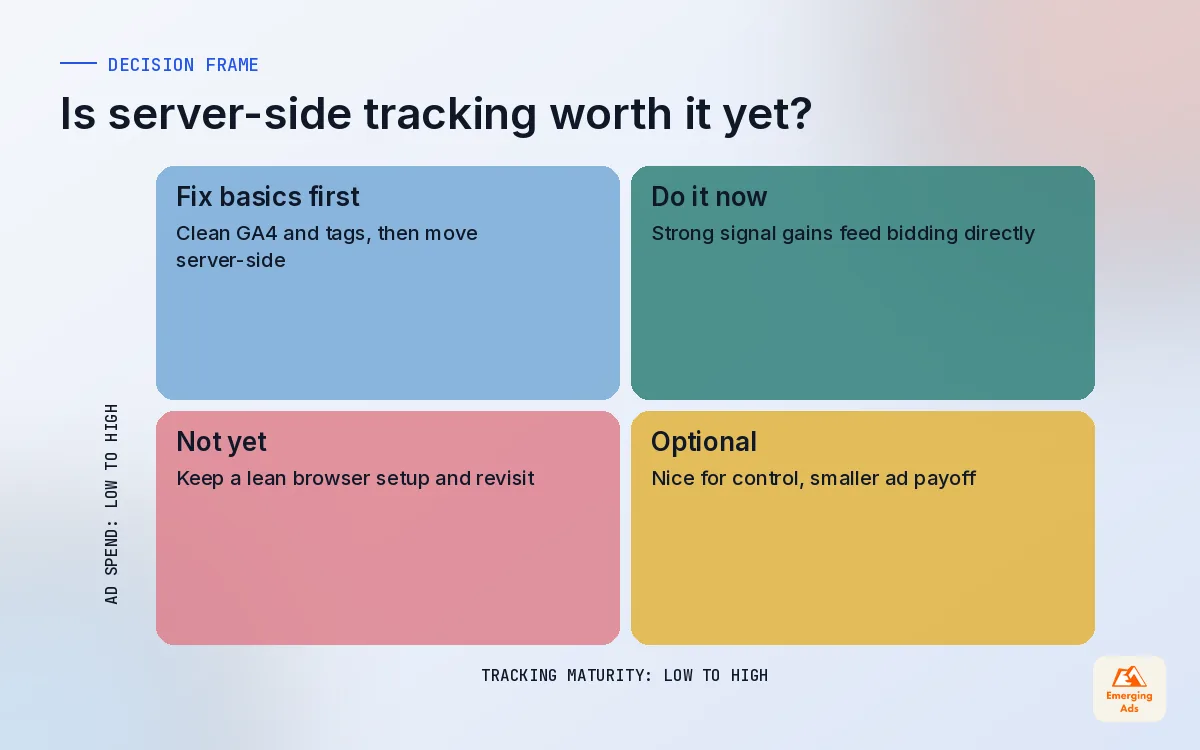
- Your basics are broken. If GA4 has no key events defined, or purchases fire twice, fix that first. A server faithfully forwards bad data.
- You barely spend on ads. The biggest payoff is better signal for bidding. With a very small budget, the gain may not cover the build and upkeep.
- Nobody will own it. Server containers need someone who checks them after platform updates. An abandoned server setup can fail silently for months.
- Your sales happen offline. If most revenue closes on the phone or in a CRM, offline conversion imports usually matter more than browser signal.
For businesses that need attribution beyond what ad platforms report, a dedicated tool like Hyros tracking and attribution can sit alongside a server setup, but we only recommend that once the fundamentals are stable.
Who gets the most out of it
The businesses that benefit most spend meaningfully on Meta, Google Ads or TikTok, sell online or capture leads on site, and have audiences where blocking and Safari usage are common. If that sounds like you, the move is usually worth it within a few months.
09Getting server-side tracking right the first time
If you take one thing from this guide, make it this: server-side tracking is a better pipe, and a better pipe only helps if the water is clean. Audit, clean, build, compare, then maintain. Skip a stage and you will spend the next quarter explaining odd numbers to your finance team.
We build and maintain these setups as part of our advanced website tracking work, usually alongside the ad accounts they feed, so the people reading the numbers are the same people who built the pipe. You can see how tracking fits the rest of what we do on our full list of services, or browse the rest of the tracking library on the whyemergingads.com homepage. For a closer look at the Meta side specifically, our next guide covers the Conversions API in detail.
Frequently asked questions
Straight answers to what clients ask us most about server-side tracking.
What is server-side tracking in simple terms?
Is server-side tracking better than client-side tracking?
Does server-side tracking get around cookie consent?
How much does server-side tracking cost?
Do I need server-side GTM to use the Meta Conversions API?
Why should the tagging server use my own subdomain?
Will server-side tracking make my GA4 numbers match my backend?
How long does a server-side tracking migration take?
Does server-side tracking improve page speed?
Is server-side tracking worth it for a small business?
What happens if the tagging server goes down?
Is your tracking leaking conversions you already paid for?
We will check your current tags, consent setup and platform numbers, then tell you plainly whether server-side tracking would pay for itself on your account.
Book your free audit