GA4 Setup in 2026: The Complete Guide We Use on Client Accounts
Most GA4 properties we inherit were installed in ten minutes and never configured. This is the GA4 setup we actually run for clients, in the order we do it, with the checks that stop bad data before it piles up.
Key takeaways
- A GA4 setup is mostly decisions, not code. The tag takes minutes; the settings, key events and naming rules are where the value sits.
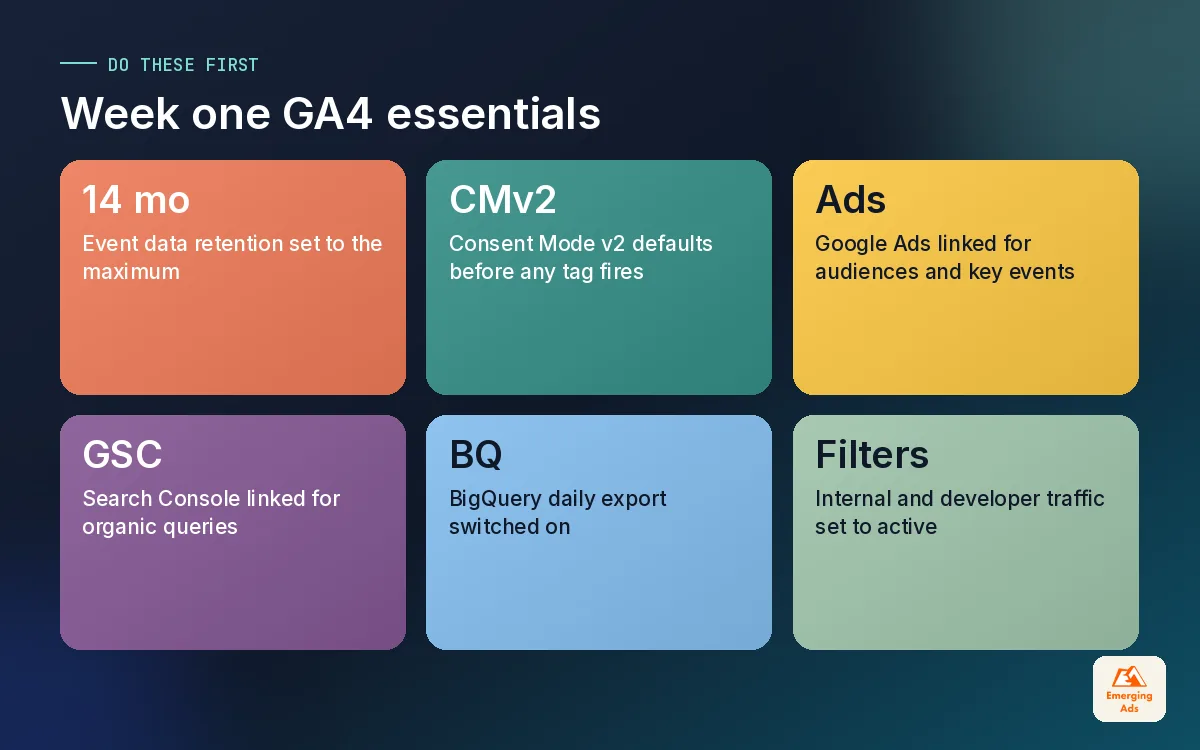
- Change data retention to 14 months, filter internal and developer traffic, and list unwanted referrals on day one. None of these fix old data.
- Pick three to six key events that map to money or real intent. Marking every click as a key event trains your ad platforms on noise.
- Consent Mode v2, the Google Ads link and the Search Console link belong in the first week, not in a later phase that never arrives.
- Turn on the BigQuery export early. It is the one GA4 feature you cannot backfill, and you will want the raw history later.
01Why most GA4 setups quietly fail
Almost every week a founder sends us a screenshot and asks why GA4 says 41 sales when Shopify says 60. Nine times out of ten the problem is not a bug. It is a GA4 setup that was never finished. Someone pasted the tag, saw the realtime report light up, and moved on. The property then ran for a year on default settings, collecting data that nobody fully trusted.
GA4 is event-based. Everything, from a page view to a purchase, is an event with parameters attached. That model is flexible, but it means the tool does very little thinking for you. Universal Analytics came with goals, views and filters that forced a bit of structure. GA4 hands you an empty room and expects you to decide where the furniture goes. Standard Universal Analytics properties stopped processing data on 1 July 2023, so there is no fallback any more: the GA4 property is the record.
The good news is that a proper setup is not a big technical project. Most of it happens in the Admin screens and in a short planning document. The code side is usually a single Google tag or a Google Tag Manager setup that fires it. What takes skill is knowing which of the dozens of settings actually matter, and which defaults will hurt you later.
02Before you touch Admin: a one-page measurement plan
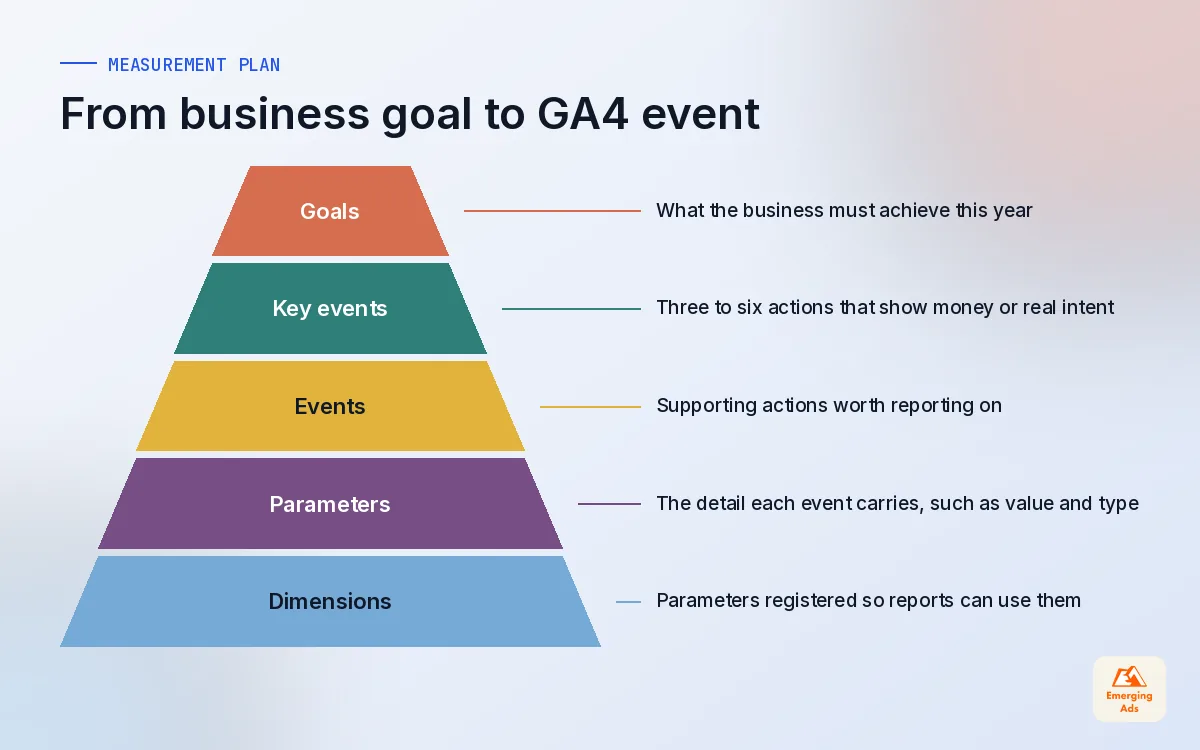
We never start a GA4 setup inside GA4. We start with a single page that answers three questions: what does the business sell, what actions show that someone is moving towards buying, and which decisions will this data inform? If you cannot answer the third question, you will collect a lot of events and use very few of them.
A useful plan is short. It lists the business goals, the key events that represent them, the parameters each event needs, and who owns each piece. Here is the skeleton we hand to clients before any configuration starts.
| Business goal | Key event | Parameters we want | Owner |
|---|---|---|---|
| Online revenue | purchase | value, currency, transaction_id, items | Developer or Shopify app |
| Qualified leads | generate_lead | form_name, lead_type, value | Tracking team via GTM |
| Booked calls | book_call | calendar_tool, service | Tracking team via GTM |
| Trial starts (SaaS) | sign_up | method, plan | Product engineering |
| Content intent | view_pricing (not a key event) | page_type | Tracking team via GTM |
Notice that the last row is an event we track but do not mark as a key event. Plenty of useful signals belong in reports without being treated as conversions. We come back to that distinction below, because it is where most GA4 properties go wrong.
03GA4 setup step by step: property, stream and the settings that matter
Once the plan is agreed, the build itself follows a fixed order. We do it the same way on every account so nothing gets skipped.
1. Property and data stream
Create one property per business, not per website section. Set the reporting time zone and currency to match how finance reports revenue, because changing the time zone later splits your history at an awkward point. Add a single web data stream for the main domain. If you also run an app, it gets its own stream inside the same property, so web and app users can be reported together.
2. Data retention
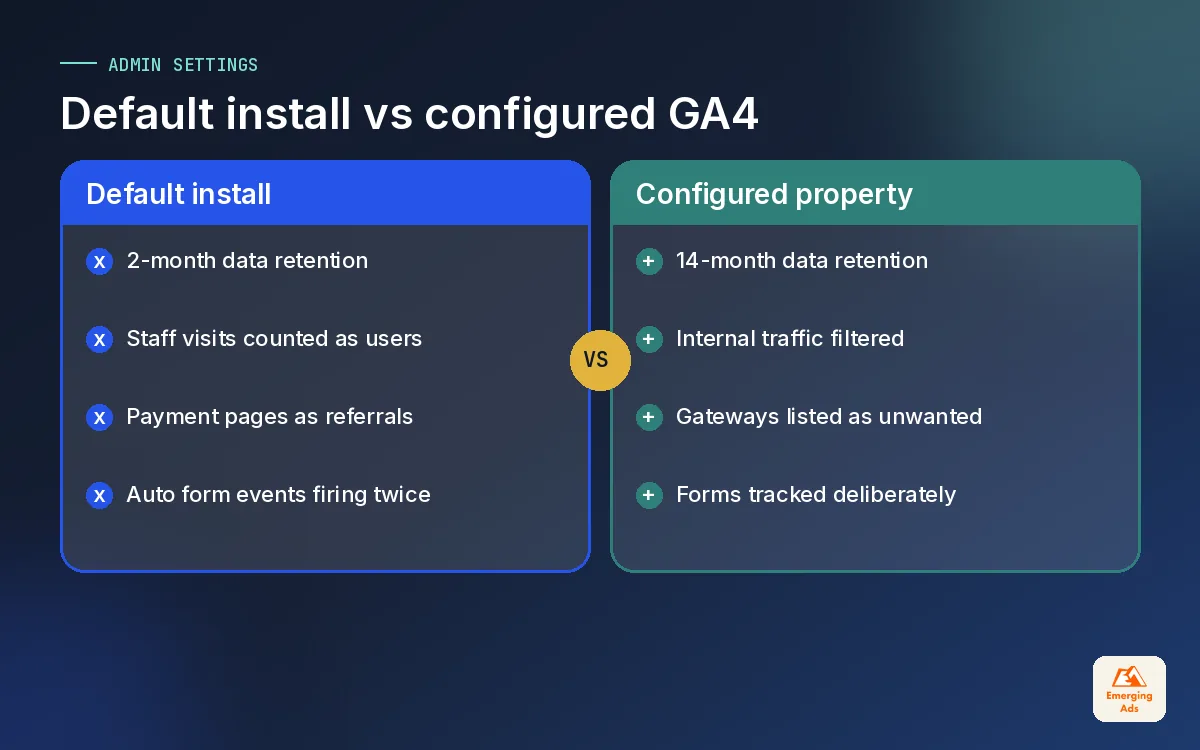
GA4 standard properties offer 2 or 14 months of event-level retention for explorations, and the default is 2 months. Change it to 14 months straight away. This setting does not affect the standard reports, but it decides how far back your explorations and funnel analysis can go. It also cannot be applied retroactively, which is why we treat it as the first click of every setup.
3. Internal and developer traffic
Define internal traffic rules for office IP addresses and any agency or call centre that browses the site all day. Then create the data filter, check it in testing mode, and switch it to active. Do the same for developer traffic so that debug sessions from preview mode stay out of your production numbers. Remote teams make IP rules imperfect, so we also recommend a simple browser flag or a GTM rule for staff who work from home.
4. Unwanted referrals and cross-domain
If checkout or booking happens on another domain, list that domain in cross-domain configuration so the session carries across. Payment providers such as PayPal, Stripe hosted checkouts or bank 3D Secure pages should go into the unwanted referrals list, otherwise a returning buyer is credited to the payment page instead of the ad that brought them. This single fix changes channel reports more than almost anything else we do.
5. Enhanced measurement
Enhanced measurement switches on page views, scrolls, outbound clicks, site search, video engagement, file downloads and form interactions automatically. Keep page views, site search (with your real query parameter) and file downloads. Be sceptical of the automatic form interactions: on many themes they fire on the wrong forms or twice per submit, so we usually switch them off and build form tracking deliberately. Page changes based on browser history events matter for single-page apps, so check that setting with your developer.
04Key events: the part of GA4 setup that shapes your ad results
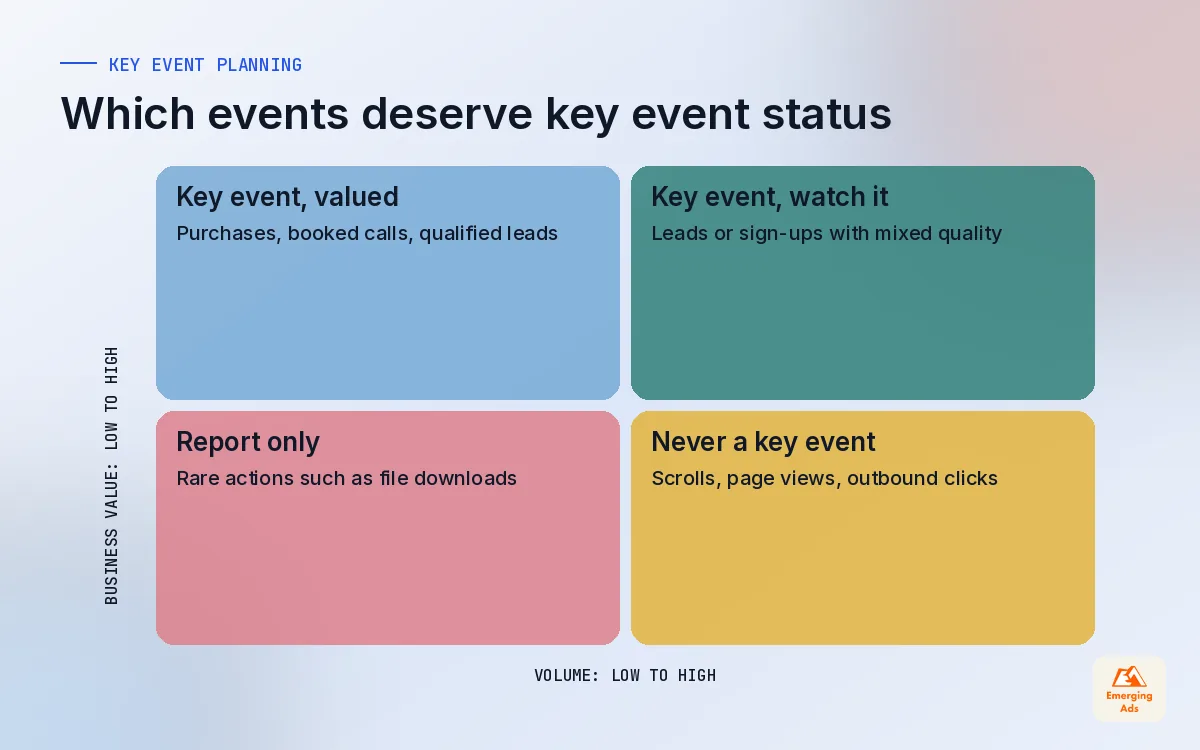
Google renamed conversions to key events inside GA4, and the rename is useful. A key event is simply an event you have told GA4 matters. The problem is what happens next: key events can be imported into Google Ads, and from there they train bidding. If a scroll or a video play is marked as a key event and imported, smart bidding will happily chase cheap scrolls.
Our rule is three to six key events per property, each tied to money or real intent. A lead-gen business might have generate_lead, book_call and a qualified call over 60 seconds. An online store might have purchase and, sometimes, begin_checkout for analysis only. Everything else stays as a normal event you can still report on.
Values on key events
Give every key event a value, even an estimated one. A booked call is not worth the same as a newsletter sign-up, and without values every report treats them equally. For ecommerce, the purchase value should come from the platform, not a guess. The full ecommerce event set (view_item, add_to_cart, begin_checkout, add_payment_info, purchase and refund, with an items array and transaction_id) deserves its own guide, so we only flag it here: install it through a proper data layer, not by scraping the thank-you page.
Custom dimensions
Parameters you send with events do not appear in standard reports until you register them as custom dimensions. Register only what someone will filter or segment by: lead_type, form_name, plan, logged-in status, content group. Event-scoped for things about the action, user-scoped for things about the person. Registering everything just clutters the interface and runs you into limits sooner.
05Consent Mode v2, links and BigQuery
These three pieces are often postponed to a later phase. In our experience the later phase rarely arrives, so we put them in week one.
Consent Mode v2
Consent Mode v2 added the ad_user_data and ad_personalization signals, and it became required for advertisers using Google ads features with users in the EEA from March 2024. Even if most of your traffic is elsewhere, set it up properly: a consent banner that sets default states before any tag fires, updates them on choice, and passes all four signals. We test it by loading the site in a clean browser, declining, and checking what actually leaves the page. Banners that look compliant but fire tags before the click are common.
Google Ads and Search Console links
Link GA4 to Google Ads so audiences and key events flow across, and so you can see cost next to behaviour. If our team also runs your Google Ads management, this is where the two sides meet. Then link Google Search Console so organic queries and landing pages sit next to engagement. Both links take minutes and remove a lot of guesswork later.
BigQuery export
GA4 BigQuery export is available on standard properties, and it is the one setting we push hardest. The export only starts from the day you switch it on; it does not backfill. Even if nobody queries it this year, a year of raw event data is what makes proper attribution modelling or a custom lifetime value model possible later. The daily export is enough for most clients. Streaming export exists too, but it carries extra Google Cloud cost and is rarely needed at the start.
The best time to switch on BigQuery export was the day you created the property. The second best time is this afternoon.
06A 14-day GA4 setup rollout plan
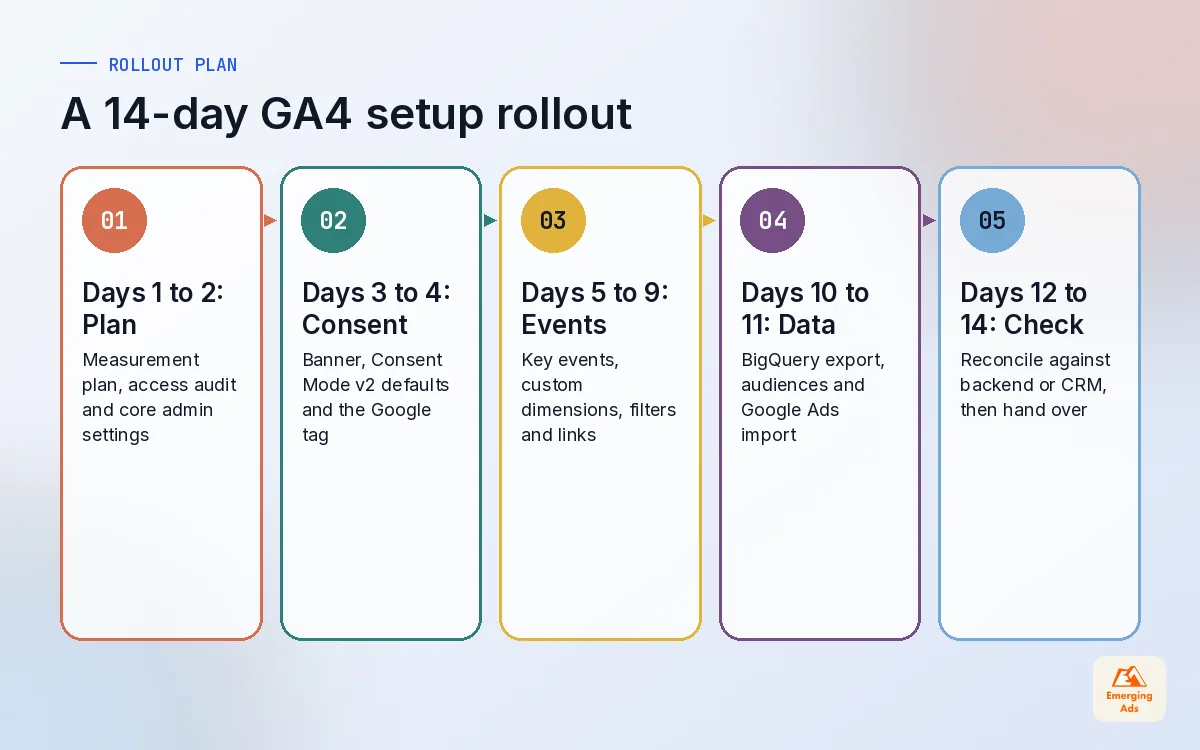
A clean setup does not need months. With access sorted and a developer available for a couple of hours, this is the schedule we run. It leaves time for QA, which is the step most rushed projects skip.
| Days | Work | Done when |
|---|---|---|
| 1 to 2 | Measurement plan, access audit, property and stream settings, 14-month retention | Plan signed off, admin settings changed |
| 3 to 4 | Consent banner and Consent Mode v2 defaults, Google tag via GTM | Tags respect consent in a clean browser |
| 5 to 7 | Key events, lead and purchase tracking, custom dimensions registered | Each key event verified in DebugView |
| 8 to 9 | Filters, unwanted referrals, cross-domain, Google Ads and Search Console links | Filters active, links live |
| 10 to 11 | BigQuery export, audiences, key event import into Google Ads | First daily export table present |
| 12 to 14 | Reconciliation against backend or CRM, reporting handover | Numbers within agreed tolerance |
The last step matters most. We compare GA4 purchases or leads against the source of truth for a few days. GA4 will never match your backend exactly, because of consent, ad blockers and browsers that limit cookies, but the gap should be stable and explainable. A gap that jumps around usually means duplicate or missing events. If your team does not have the hours for this, our GA4 setup service runs the same plan end to end.
07Our GA4 setup QA checklist
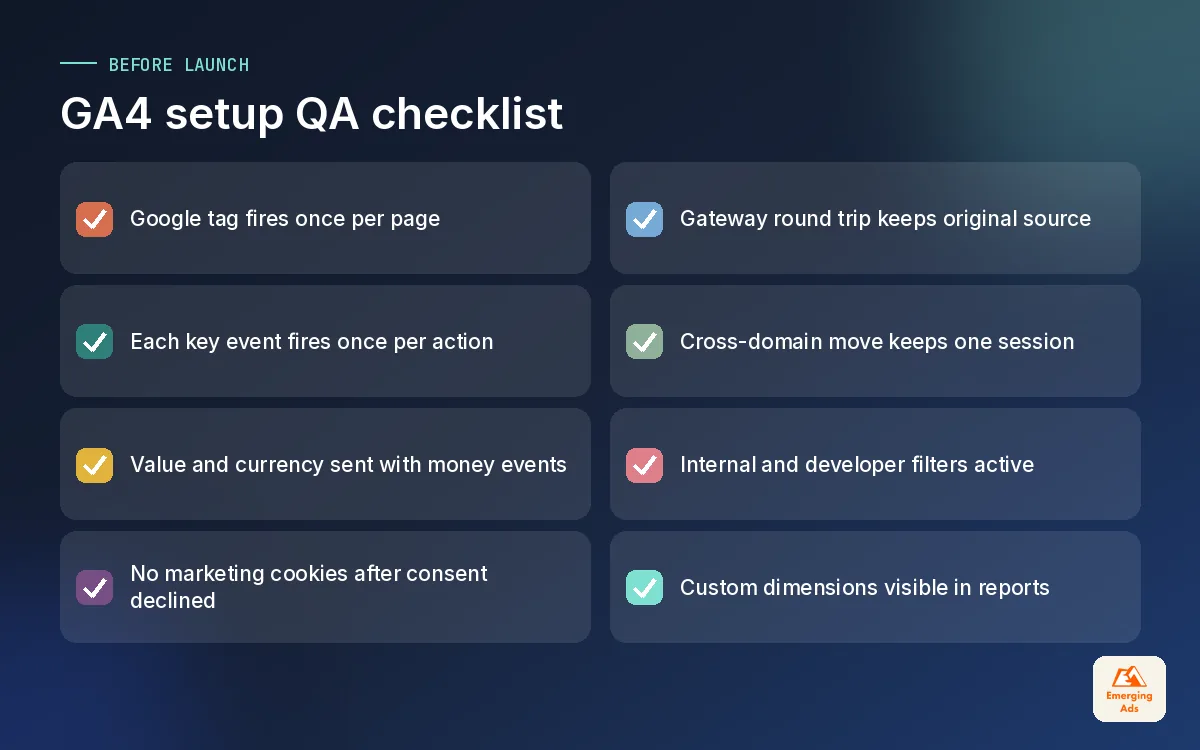
Before we call a property finished, we walk through this list with DebugView and Tag Assistant open. It takes about an hour and catches most of the problems we would otherwise find three months later.
- One tag, once. The Google tag fires a single time per page. Hard-coded tags plus a GTM tag is the classic cause of doubled sessions.
- Key events fire once per action. Submit a test form twice and refresh the thank-you page. You should see exactly two events, not four.
- Values and currency. Every key event with money attached sends value and currency, in the right format.
- Consent behaviour. With consent declined, no marketing cookies are set and the consent state is visible in Tag Assistant.
- Referrals. A test purchase through the payment gateway returns with the original source intact.
- Cross-domain. Moving from the main site to the booking or checkout domain keeps one session.
- Filters. Internal and developer traffic filters are active, not stuck in testing.
- Custom dimensions. Registered parameters appear in reports after the processing delay.
08Keeping GA4 healthy after launch
A GA4 property drifts. A developer changes the checkout, a marketer installs a new form plugin, an app update renames a page. We schedule a light check every month and a proper conversion tracking review every quarter, especially before big sales periods.
- Monthly: compare key event counts with the CRM or store backend, scan the referral report for new payment or login domains, and check that no new unassigned traffic has appeared.
- Quarterly: review key events against current business goals, clear out unused custom dimensions, and confirm the Google Ads import is still using the right events.
- Before any site change: test in a staging environment with preview mode, then retest live on launch day.
Reporting is the other half. GA4 explorations are powerful but most founders will not open them. We usually build a simple Looker Studio dashboard on top so that the numbers leadership sees each Monday come from the same, clean property. For deeper event design, custom reports and ongoing support, our GA4 tracking service picks up where this guide ends.
If you want to see how GA4 fits alongside server-side tagging, ad platform tracking and CRM data, the whyemergingads.com homepage brings the whole series together, and the full list of EmergingAds services shows how tracking connects to the media we buy. Start with the 14-month retention setting today. It costs nothing and you will be glad of it next year.
Frequently asked questions
Straight answers to what clients ask us most about ga4 setup.
How long does a GA4 setup take?
Should I install GA4 directly or through Google Tag Manager?
What data retention setting should I use in GA4?
How many key events should a GA4 property have?
Why does GA4 show fewer sales than Shopify or my CRM?
Do I need Consent Mode v2 if my business is not in Europe?
What should I switch off in GA4 enhanced measurement?
Is the GA4 BigQuery export worth it for a small business?
How do I stop payment gateways appearing as referral traffic?
Can I fix old GA4 data after changing settings?
What is the difference between an event and a key event in GA4?
Is your GA4 telling you the truth?
We will check your property settings, key events and consent behaviour against your real sales data and send you a short, prioritised list of fixes.
Book your free audit