Google Tag Manager in 2026: The Complete Guide to a Container You Can Trust
Google Tag Manager is either the calmest part of your marketing stack or the most dangerous. The difference is not the tool, it is the habits around it. Here is how we build and run containers for client businesses.
Key takeaways
- Google Tag Manager is a delivery system. It decides which tags load, when, and with what data, so its quality sets the quality of every report downstream.
- Every container rests on three building blocks: tags, triggers and variables. Clear names for all three save more time than any clever technique.
- Work in named workspaces, preview every change, and publish versions with notes. Rolling back a bad release should take one minute.
- Set consent checks on every marketing tag and test with consent declined. A container that fires before the banner is answered is a liability.
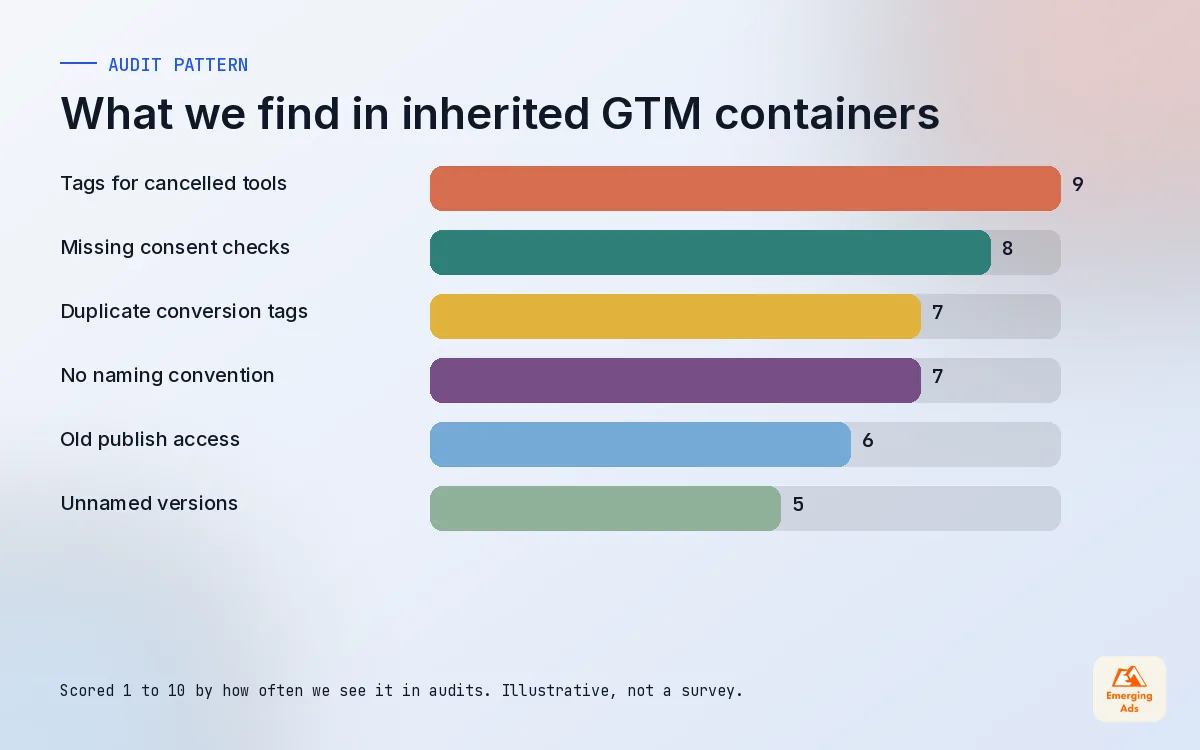
- Audit the container every quarter. Most accounts we inherit carry tags for tools that were cancelled years ago.
01What Google Tag Manager actually does
Google Tag Manager is a free container that sits on your website and decides which tracking scripts load, when they load, and what information they carry. Instead of asking a developer to paste a new snippet every time marketing adds a tool, you install one container once and manage the rest from a web interface. GA4, Google Ads, Meta, LinkedIn, TikTok, heatmap tools and chat widgets can all run through it.
That convenience is also the risk. Anyone with publish rights can change what runs on your checkout in a few clicks. On accounts we take over, we regularly find containers where three different agencies have added tags over the years, nobody remembers why half of them exist, and the purchase event fires twice because two people solved the same problem in different ways.
So we treat GTM as infrastructure, not a toy. The rest of this guide covers how it works and, more importantly, the habits that keep it trustworthy. If you have not set up your analytics property yet, read our GA4 setup guide first, because GTM is only as useful as the plan behind it.
02The building blocks: tags, triggers and variables
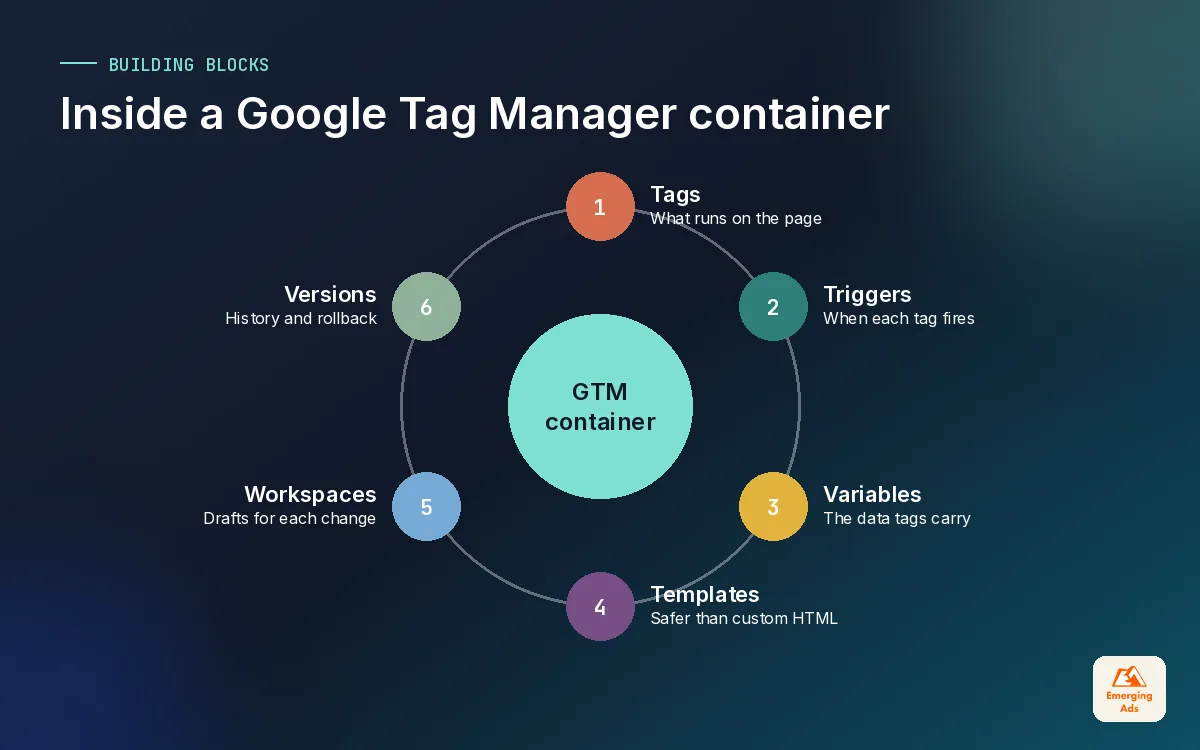
Every Google Tag Manager container is built from the same three pieces. Once they click, the interface stops feeling intimidating.
Tags
A tag is the thing that runs: the Google tag for GA4, a GA4 event, a Google Ads conversion, the Meta Pixel, the LinkedIn Insight Tag, a TikTok pixel, or a custom HTML snippet. Use the built-in or Community Template Gallery versions wherever possible. Templates have defined permissions and are far easier to audit than a block of pasted JavaScript.
Triggers
A trigger decides when a tag fires. Page views, clicks, form submissions, custom events, history changes, element visibility and timers are the common types. The best triggers listen for a clear custom event pushed by the site, such as a lead_submitted event after the form succeeds. The worst ones guess from button text or CSS classes that change when someone redesigns the page.
Variables
Variables hold the values tags and triggers need: the page path, a click URL, a transaction value, a consent state, your GA4 measurement ID. Turn on the built-in variables you actually use and create user-defined ones for everything else. A constant variable for each platform ID means you change it in one place, not in twelve tags.
| Piece | Question it answers | Good example | Fragile example |
|---|---|---|---|
| Tag | What runs? | GA4 event tag named GA4 | Event | generate_lead | Custom HTML tag called New tag 7 |
| Trigger | When does it run? | Custom event lead_submitted from the site | Click on any element containing Submit |
| Variable | With what data? | Data layer value for order total | DOM text scraped from the price element |
Much of that fragility disappears once the site pushes structured information into the data layer. We cover how to write that spec in a separate guide; for now, just know that GTM works best when the site tells it what happened rather than GTM guessing.
03Naming conventions and folders that survive staff changes
The single cheapest improvement to any Google Tag Manager container is a naming convention. It costs nothing, it takes an afternoon to apply, and it turns a container that only one person understands into one anybody on the team can read.
Our convention is Platform, then Type, then Detail, separated by a vertical bar. It sorts nicely in the tag list and makes gaps obvious.
- Tags: GA4 | Event | purchase, GAds | Conversion | Booked call, Meta | Event | Lead, LinkedIn | Insight | All pages.
- Triggers: CE | lead_submitted (custom event), Click | Pricing CTA, PV | Thank you page. The prefix tells you the trigger type at a glance.
- Variables: DLV | ecommerce.value (data layer variable), Const | GA4 ID, JS | Page type. Again, the prefix is the type.
- Folders: one per platform plus one called Deprecated, where tags go for a month before deletion so you can check nothing breaks.
Write the convention down in the container notes or a shared document. Agencies and freelancers come and go; the naming rules should outlast all of them.
04Workspaces, versions and permissions
Google Tag Manager has proper change control built in. Most teams simply do not use it.
Workspaces
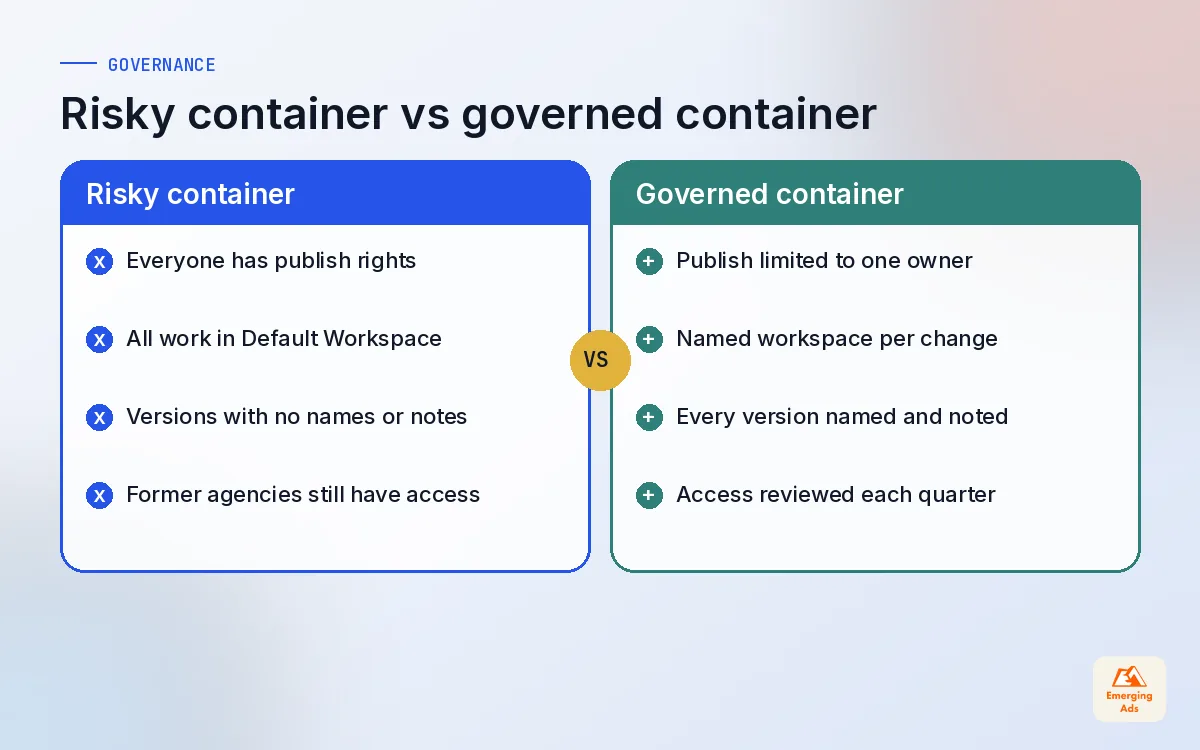
A workspace is a draft copy of the container where changes are made before publishing. Use a named workspace per piece of work, such as Meta CAPI dedup fix or Black Friday banner test, not the Default Workspace for everything. When two people work in separate workspaces, GTM flags conflicts instead of letting one person silently overwrite the other.
Versions
Each publish creates a version. Give it a name and a note that says what changed and why. When something breaks at 9pm on a Friday, you want to see that version 84 added a new TikTok tag and roll straight back to version 83. Without notes, you are opening versions one by one and comparing them by eye.
Permissions
GTM separates account access from container access, and container access into read, edit, approve and publish. Very few people need publish rights. On our client accounts, the business owns the account, our team holds publish on the containers we manage, and freelancers get edit only. Remove access the week someone leaves. We still find former employees and agencies with publish rights on containers that run checkout pages.
If you cannot say who published the last change and why, you do not really control your tracking.
05Preview mode and a publishing workflow that avoids Friday fires
Preview mode opens Tag Assistant alongside your site and shows every event, which tags fired, which did not, and the value of every variable at that moment. It is the most important feature in Google Tag Manager and the one we see skipped most often.
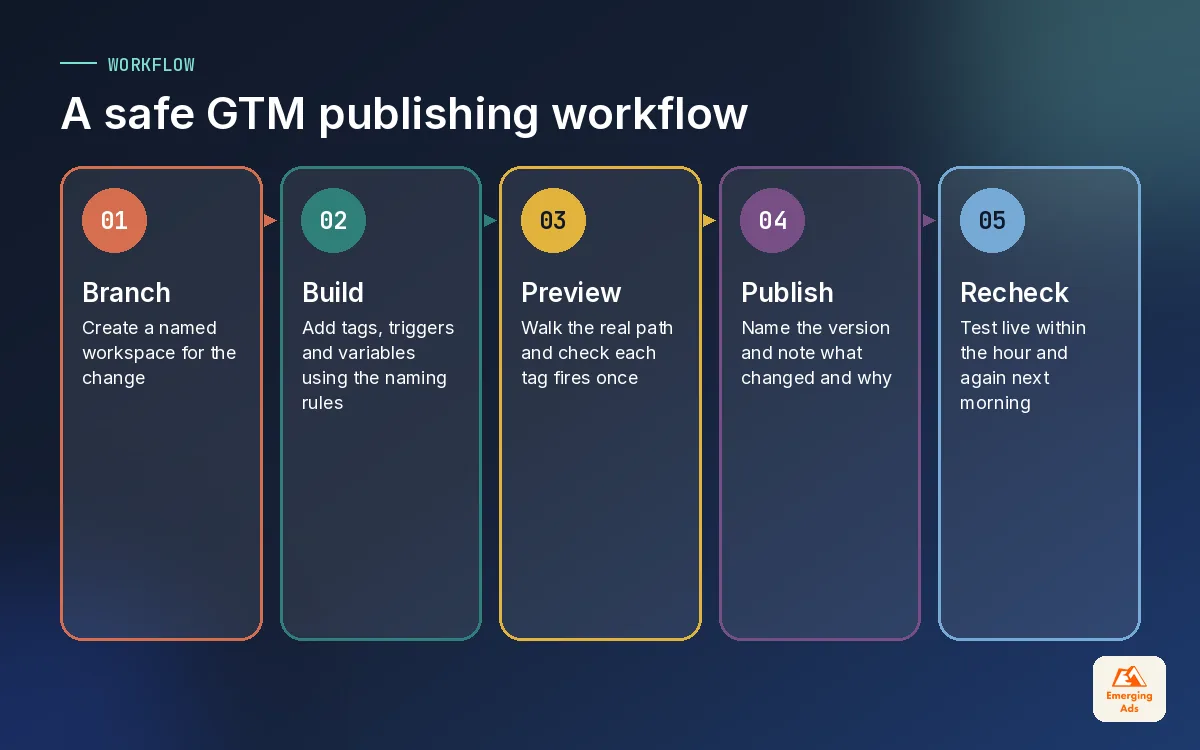
Our publishing workflow is deliberately boring:
- Branch. Create a named workspace for the change.
- Build. Add or edit tags, triggers and variables using the naming convention.
- Preview. Walk the real path: land from an ad URL with parameters, browse, submit the form or buy, and check each tag fired once with the right values.
- Check the destination. Confirm the event arrived in GA4 DebugView, the Meta Events Manager test tool or the relevant platform, not just that the tag fired.
- Publish with a note. Name the version and describe the change in one or two sentences.
- Recheck live. Repeat the key path on the live site within the hour, then again the next morning when real traffic has flowed through.
06The common tags in a Google Tag Manager container, and how we configure them
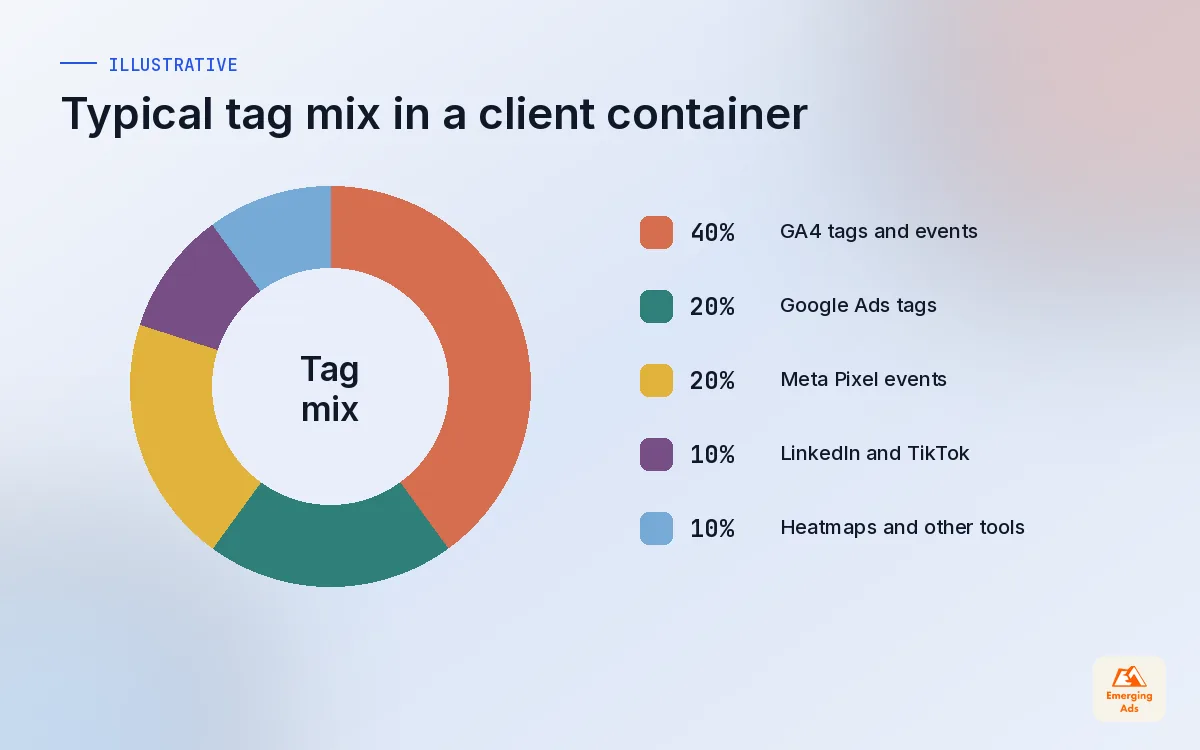
Most client containers carry the same core set of tags. The details differ by business, but these are the patterns we apply every time.
| Tag | Fires on | Settings we always check |
|---|---|---|
| Google tag (GA4) | All pages, after consent defaults | One per container, measurement ID in a constant variable |
| GA4 event tags | Custom events from the site | Parameters mapped, no duplicate firing on refresh |
| Google Ads conversion plus conversion linker | Purchase or qualified lead event | Value, currency, transaction ID, enhanced conversions data |
| Meta Pixel | Page views and standard events | event_id set so the server-side event can be deduplicated |
| LinkedIn Insight Tag | All pages, conversions on key events | Consent check, conversion names matching Campaign Manager |
| TikTok pixel | Page views and standard events | Event names mapped correctly, consent check applied |
A few notes from live accounts. The Meta Pixel should always send an event_id, because Meta deduplicates Pixel and Conversions API events using event_name plus event_id. Setting it now saves a rebuild when you add the server side, which our Meta Pixel tracking setup covers in detail. Google Ads enhanced conversions send hashed first-party data such as email, so the tag needs a clean variable for it. B2B clients running LinkedIn Ads often have the Insight Tag installed but no conversions attached, which means the campaigns optimise for clicks. And brands testing TikTok ads regularly launch with the pixel firing on page view only.
Tag sequencing and firing priority
Sometimes one tag must fire before another: a setup tag that sets a variable, or a cleanup tag after a conversion. Tag sequencing handles that in the tag’s advanced settings. Use it sparingly. If you need chains of three or four sequenced tags, the logic probably belongs in the site’s data layer instead.
07Consent settings in Google Tag Manager
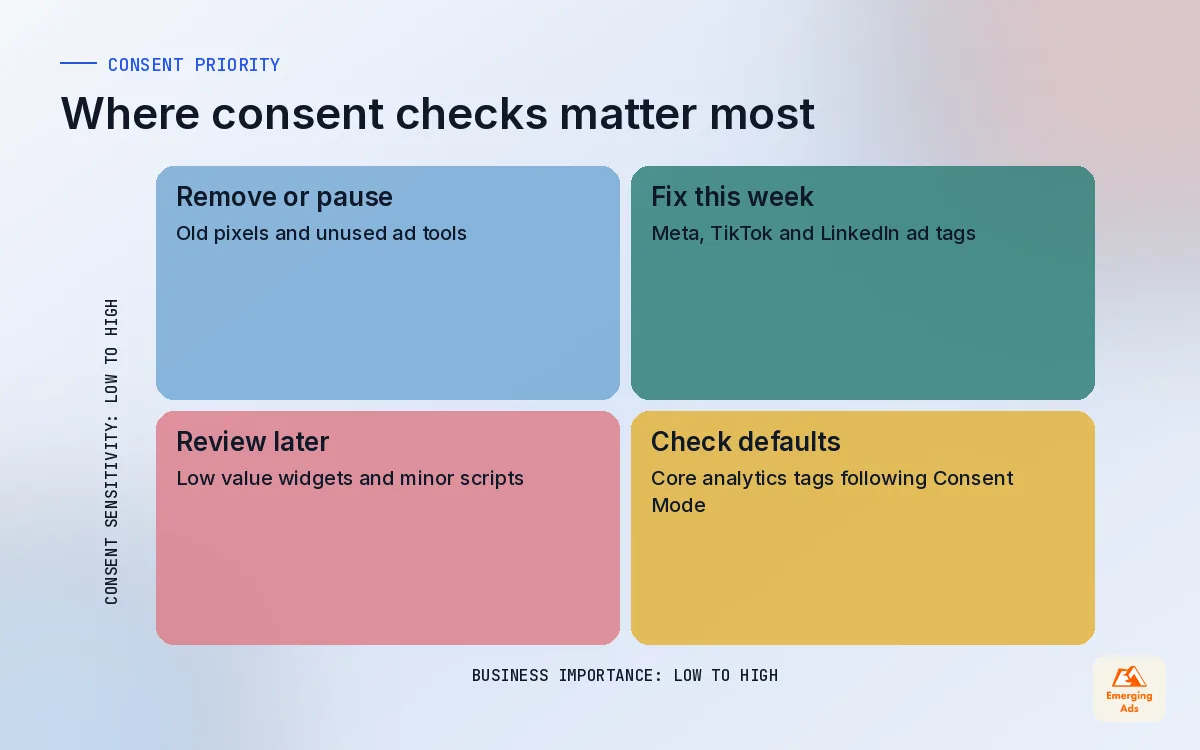
Consent is where Google Tag Manager has changed most in recent years, and where we find the most risk. Google Consent Mode v2 added the ad_user_data and ad_personalization signals, and it became required for advertisers using Google ads features with EEA users from March 2024. GTM has built-in consent checks on tags and a consent overview screen that shows which tags require which consent types.
- Set defaults first. The consent default command must run before any tag that reads consent. Most consent platforms supply a GTM template that does this on the Consent Initialization trigger.
- Google tags read consent natively. Google tags adjust their behaviour based on consent state. Non-Google tags such as Meta, LinkedIn and TikTok need explicit additional consent checks in their settings.
- Test declined, not just accepted. Open a clean browser, decline everything, and watch what fires in preview mode and what cookies are set. This is the test most setups fail.
- Heatmap and session tools count too. Tools like Hotjar heatmaps need the same consent treatment as ad pixels.
Server-side tagging is often pitched as a way around consent. It is not. A server container moves where tags run and can improve data quality, but the consent rules still apply to the data you collect. We cover server-side properly in its own guide.
08Container hygiene: how we audit and clean up a messy GTM
Every quarter, and whenever we inherit an account, we run a container clean-up. It rarely takes more than a day, and it usually makes pages lighter and numbers cleaner at the same time. Faster pages also help conversion rates, which is why our CRO services team asks for this before any testing starts.
- Export and list. Export the container and list every tag with its platform, trigger and last known owner.
- Find the dead. Tags for cancelled tools, old campaigns, or pixels with IDs nobody recognises go to the Deprecated folder with firing paused.
- Find the duplicates. Two GA4 configuration tags, a hard-coded pixel plus a GTM pixel, or purchase events on both a page view and a custom event.
- Replace custom HTML. Swap pasted scripts for official or community templates where one exists.
- Check consent on every tag. Any marketing tag without a consent check is fixed before anything else.
- Rename. Apply the naming convention so the next audit is faster.
- Publish and watch. Publish the clean-up as one named version and compare key event counts for the following week.
If this feels like a lot, that is normal. Our Google Tag Manager setup service handles builds and clean-ups end to end, and our wider GTM tools and solutions work covers custom templates and more complex setups. The key is that someone owns the container, and that the ownership is written down.
09When Google Tag Manager needs outside help
A small business with a single site and three or four tags can run GTM in-house with the habits above. Outside help earns its keep when the container touches revenue reporting across several ad platforms, when a checkout or booking flow spans more than one domain, when consent needs to work across regions, or when the numbers in GA4, the ad platforms and the backend have stopped agreeing and nobody can say why.
Google Tag Manager is also the foundation for the rest of this series. A clean container feeds your GA4 configuration, your ad platform tracking and, later, a server container. You can follow the whole series from the whyemergingads.com homepage, or see how tracking connects to the campaigns we run in the full list of our marketing services. Start with names and permissions this week. Everything else gets easier once those are in place.
Frequently asked questions
Straight answers to what clients ask us most about google tag manager.
Is Google Tag Manager free?
Do I still need a developer if I use Google Tag Manager?
What is the difference between Google Tag Manager and GA4?
How do I test changes in Google Tag Manager before publishing?
Why are my conversions counted twice after adding GTM?
Who should have publish access to a GTM container?
Can Google Tag Manager slow down my website?
How should I name tags, triggers and variables in GTM?
Does Google Tag Manager handle cookie consent automatically?
What is tag sequencing in Google Tag Manager?
How often should a GTM container be audited?
Want a second pair of eyes on your GTM container?
We will review your tags, triggers, consent settings and publishing history, then send a short list of what to fix, what to delete and what to leave alone.
Book your free audit