The Practical Meta Conversions API Guide We Hand to New Clients
The Meta Conversions API is the single tracking change that most often improves a struggling Meta account. It is also the one we most often find half set up. This is the guide we give new clients on day one.
Key takeaways
- The Meta Conversions API sends events from your server to Meta, alongside the browser Pixel, so fewer conversions go missing.
- Run Pixel and CAPI together and deduplicate them: the same event_name and event_id on both, or Meta counts one sale twice.
- Event match quality depends on the customer information you send, such as hashed email and phone, fbp, fbc, IP address and user agent.
- Pick the setup route that fits your stack: a partner integration, the Conversions API Gateway, server-side GTM or a direct API build.
- Judge success by how close Meta’s reported conversions come to your backend, and give the algorithm a few weeks to adjust before judging results.
01What the Meta Conversions API is, and why it exists
The Meta Conversions API (often called CAPI) lets your server send conversion events straight to Meta, instead of relying only on the Pixel running in the visitor’s browser. When someone buys, books or submits a form, your website backend, your ecommerce platform or a server container tells Meta directly. Meta then uses that event for reporting, attribution and, most importantly, to optimise who sees your ads.
It exists because browser tracking has become unreliable. Ad blockers stop the Pixel on some devices, Safari shortens the life of cookies set by scripts, pages close before tags finish loading, and consent choices remove some visitors entirely. Every missed purchase is a purchase Meta cannot learn from. On the accounts we take over, weak signal is one of the most common reasons a campaign that looks fine on paper struggles to scale.
We manage Meta accounts for ecommerce stores, lead-gen businesses, clinics and app brands. In almost every audit, the question is not whether the Conversions API is needed. It is whether the version already installed is actually doing its job. Plenty of accounts show a green tick in Events Manager and still double count purchases or send events with almost no customer information.
Pixel vs Conversions API in plain terms
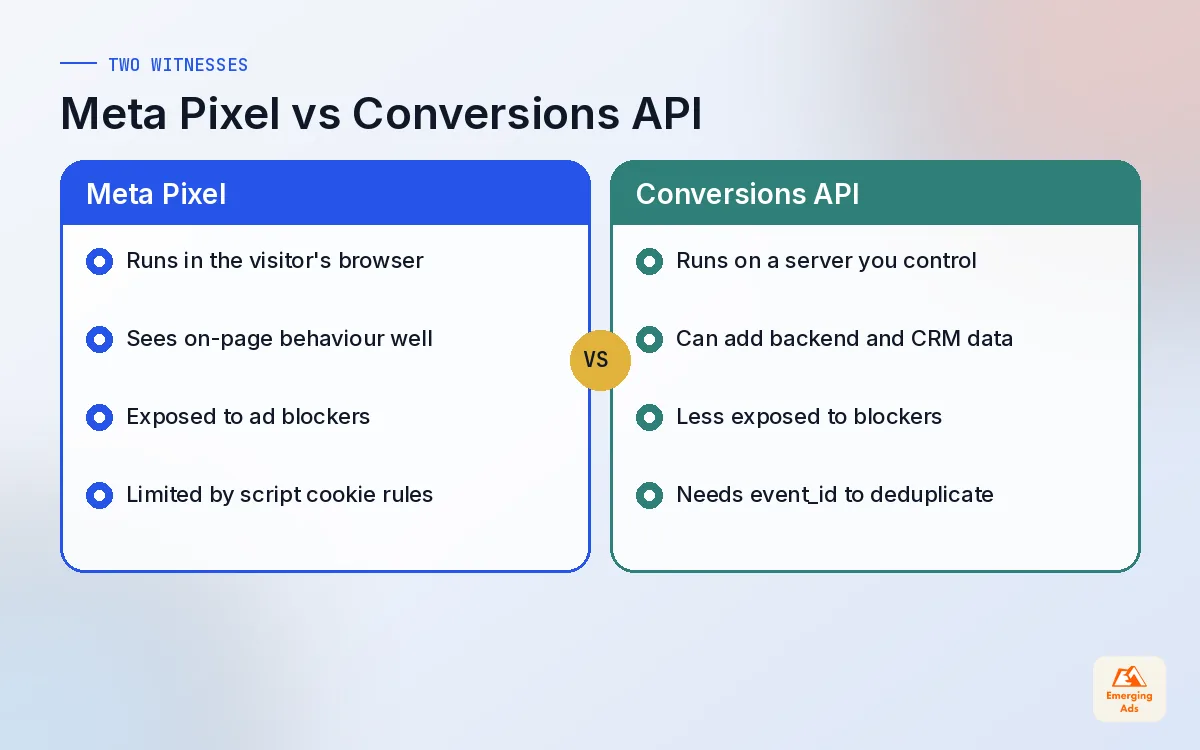
- The Pixel is JavaScript in the browser. It sees on-page behaviour well, like page views and add to cart clicks, but it is exposed to blockers and browser limits.
- The Conversions API runs on a server. It is not affected by browser blockers in the same way, and it can include data your backend knows, like order value after discounts or a CRM lead status.
02Pixel plus Conversions API: why redundancy wins
Think of the Pixel and the Conversions API as two witnesses to the same sale. Sometimes both see it. Sometimes only one does: the Pixel was blocked, or the server call failed, or the visitor closed the tab. Running both means Meta hears about more of your real conversions than either method could deliver alone.
The catch is that when both witnesses see the same sale, Meta must know it is one sale, not two. That is what deduplication is for, and it is where most broken setups go wrong.
| Scenario | Pixel | Conversions API | What Meta should record |
|---|---|---|---|
| Normal visit, no blockers | Fires | Fires | One conversion, deduplicated |
| Ad blocker active | Blocked | Fires | One conversion from the server |
| Browser closes early | Missed | Fires | One conversion from the server |
| Server call fails | Fires | Missed | One conversion from the browser |
| Consent declined | Not sent | Not sent | Nothing, and that is correct |
That last row matters. The Conversions API is not a way to track people who said no. We cover the consent side in depth in our server-side tracking guide, and the same rules apply here.
03Deduplication with event_id, explained properly
Meta deduplicates Pixel and Conversions API events using two fields: event_name and event_id. If the browser sends a Purchase with event_id A1234 and the server sends a Purchase with event_id A1234, Meta keeps one. If the IDs differ, or one side leaves the ID blank, Meta may count both.
How to generate a good event_id
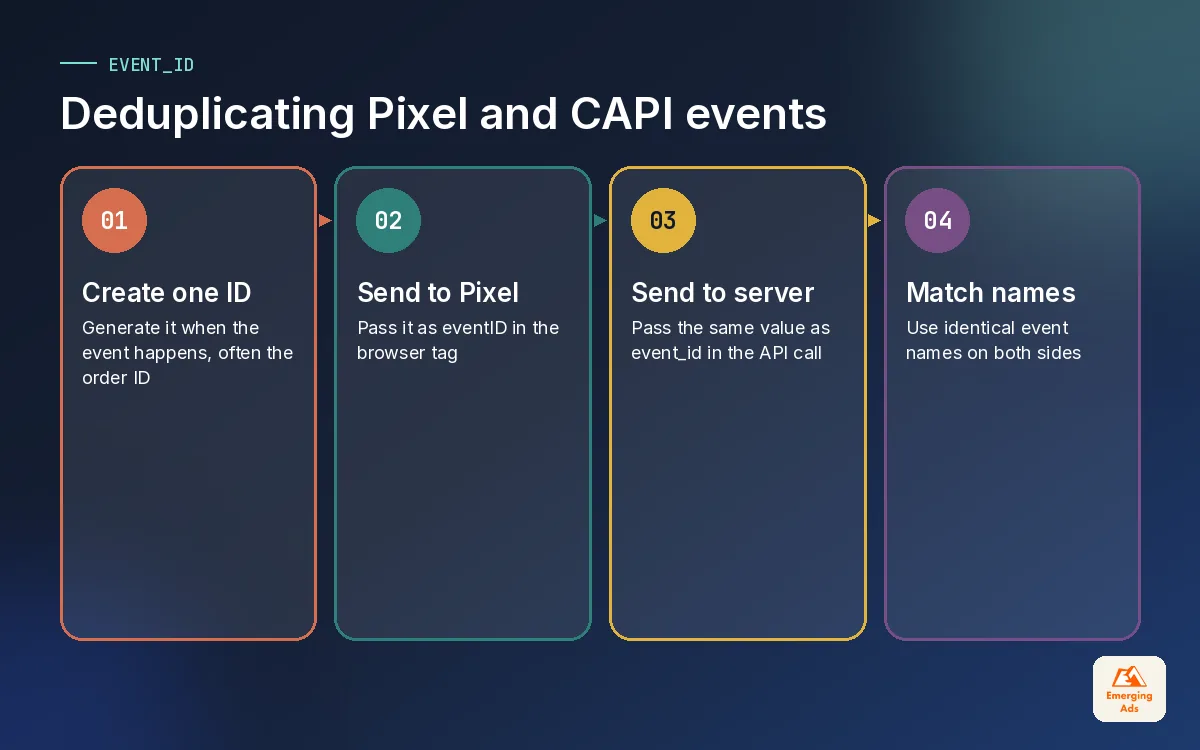
- Create the ID once, at the moment the event happens, and share it with both the browser and the server. For purchases, the order ID or transaction ID is often the simplest choice.
- Pass it to the Pixel as the eventID option on the fbq call, or through your tag manager’s Meta tag field.
- Pass the same value as event_id in the Conversions API payload.
- Keep event names identical. Purchase on one side and purchase or Order Complete on the other will not deduplicate.
For events without a natural ID, like ViewContent or AddToCart, we generate a random unique ID in the data layer and push it to both sides. If your site runs on Google Tag Manager, this is straightforward to wire up. Our Google Tag Manager guide explains the container structure we use, and our team handles GTM builds and fixes when the container is already a tangle.
04Event match quality and customer information parameters
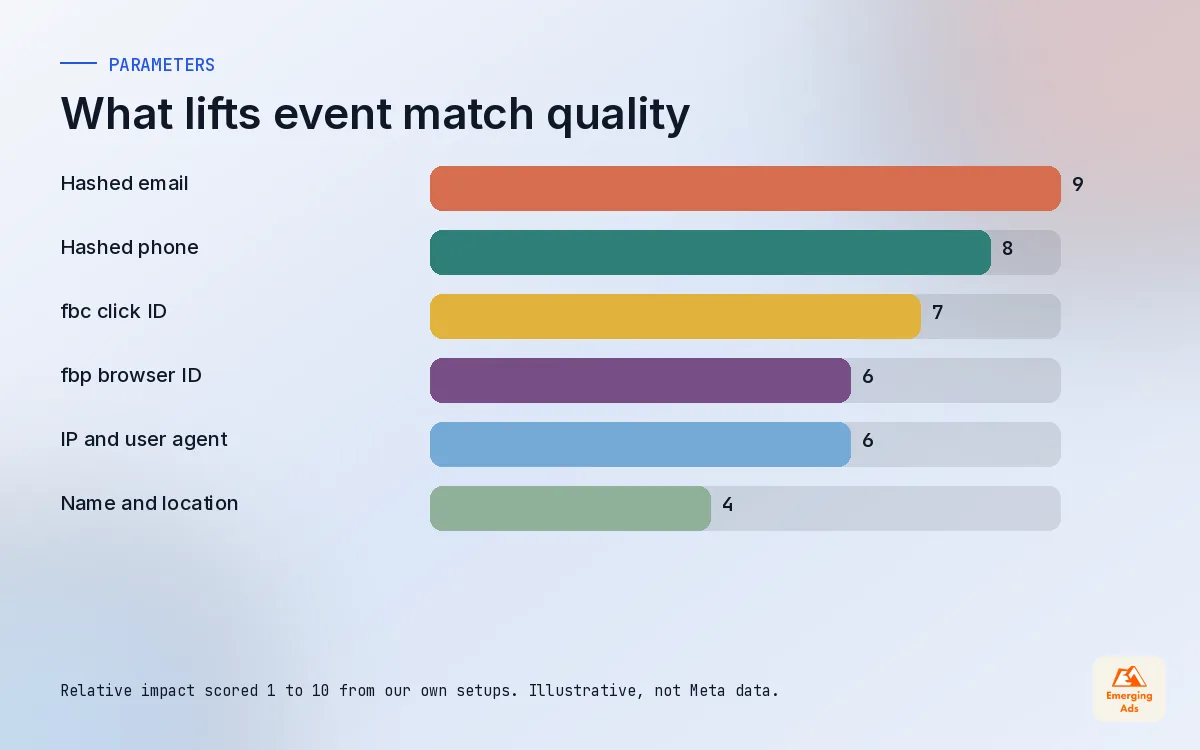
Sending an event is only half the job. Meta also has to match it to a person on its platforms. Event match quality is Meta’s score for how well the customer information in your events allows that matching. Better matching means more conversions attributed to the right ads and better signal for optimisation.
The score depends on which customer information parameters you include. Meta expects personal identifiers such as email and phone to be normalised and hashed with SHA-256 before sending. Browser identifiers such as IP address and user agent are sent as they are.
| Parameter | What it is | Notes from our setups |
|---|---|---|
| em | Email address, hashed | Usually the strongest single identifier on purchases and leads |
| ph | Phone number, hashed | Normalise to digits with country code before hashing |
| fn, ln | First and last name, hashed | Lowercase and trim before hashing |
| ct, st, zp, country | City, region, postcode, country, hashed | Useful where checkout collects them |
| external_id | Your own customer or lead ID | Helps link repeat customers over time |
| client_ip_address, client_user_agent | From the visitor’s request | Needed for server events on websites |
| fbp, fbc | Meta browser ID and click ID cookies | Capture and pass them from the browser to the server |
Where match quality usually breaks
- Top-of-funnel events like ViewContent carry no customer data at all, which is normal, but purchases and leads should carry plenty.
- The fbc value is never captured, so the click ID from the ad visit is lost by the time the server sends the event.
- Email is sent unhashed or hashed without trimming and lowercasing first, so it will not match.
- The server event is sent with the server’s own IP address rather than the visitor’s.
For lead-gen accounts, match quality also improves when you send later-stage events from your CRM, such as qualified lead or booked appointment. Our CRM automation setup work usually includes that loop, and simple flows can run through Zapier automations when a full developer build is not justified.
05Meta Conversions API setup routes compared
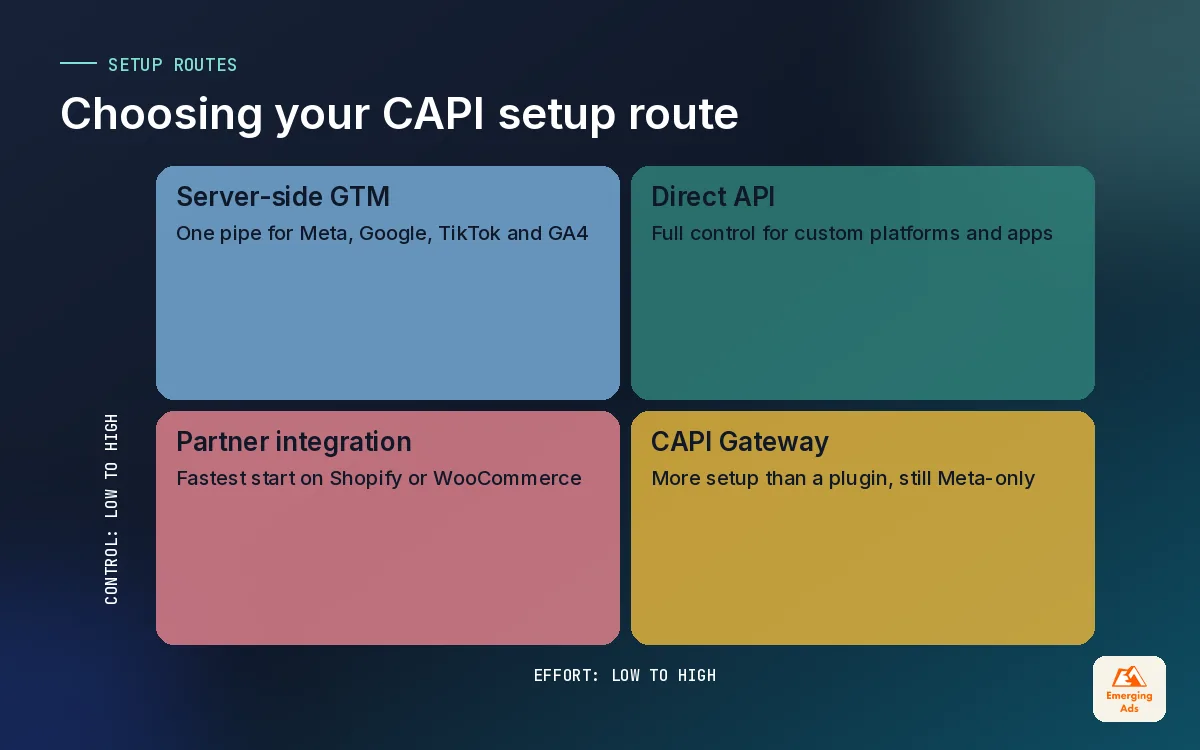
There is no single right way to set up the Meta Conversions API. The right route depends on your platform, your developer access and how many other ad platforms you want to feed from the same pipe.
1. Partner integrations
Platforms like Shopify and WooCommerce offer integrations that send server events to Meta with little or no code. On Shopify, Meta’s own sales channel app handles it through its data sharing settings. This is the fastest route and often good enough for smaller stores, though you get less control over event parameters and deduplication details.
2. Conversions API Gateway
Meta offers a Conversions API Gateway that runs in your own cloud account and mirrors Pixel events to the server side. It suits businesses that want a Meta-focused setup without much custom development.
3. Server-side Google Tag Manager
Our preferred route when a business already uses GTM and advertises on more than one platform. One tagging server sends the same clean events to Meta, Google Ads, TikTok and GA4, and you control every parameter.
4. Direct API integration
Developers call the API from your backend. This gives full control and suits custom platforms, subscription billing systems or apps, but needs ongoing developer time whenever Meta changes requirements.
| Route | Best for | Effort | Control |
|---|---|---|---|
| Partner integration | Shopify and WooCommerce stores getting started | Low | Limited |
| Conversions API Gateway | Meta-only setups with little dev time | Low to medium | Moderate |
| Server-side GTM | Multi-platform advertisers already on GTM | Medium | High |
| Direct API | Custom platforms, apps, CRM-driven sales | High | Full |
Whichever route you pick, the rules on deduplication and customer information stay the same. Our Meta Pixel and Conversions API setup service covers all four routes, and we choose based on your stack rather than our preference.
06Testing your setup in Events Manager
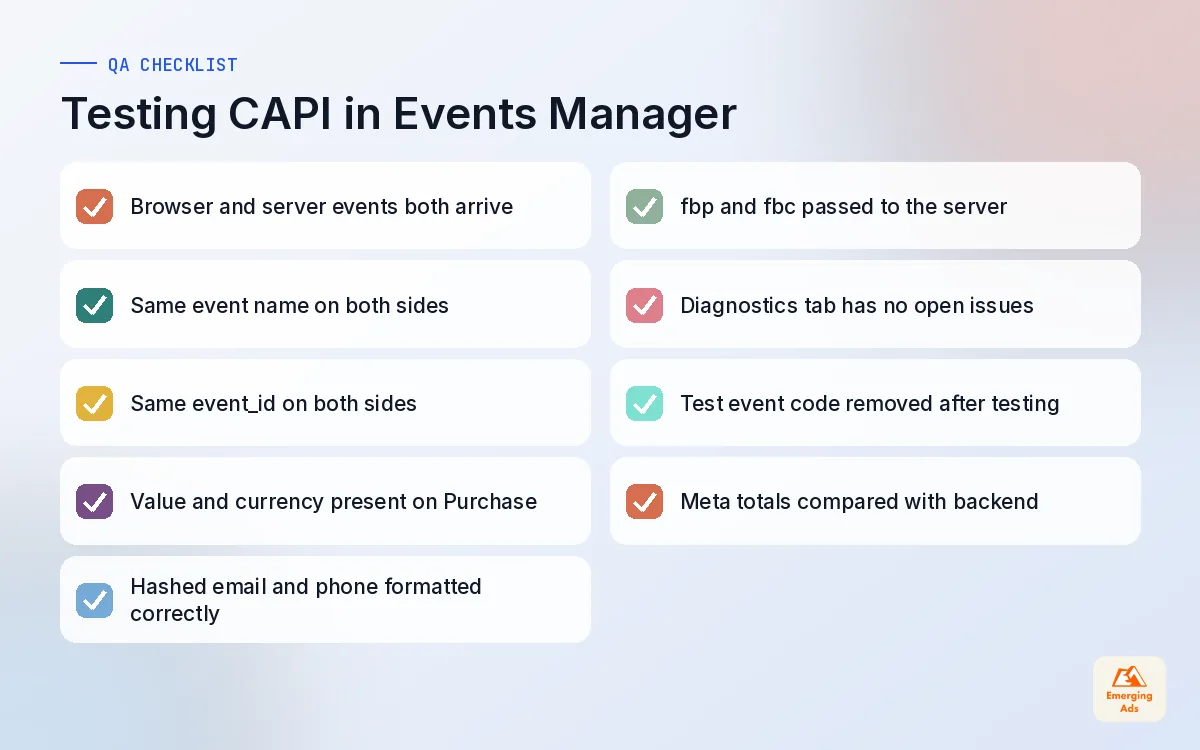
Never trust a Conversions API setup you have not tested with a real test order or form submission. Events Manager gives you what you need to check it properly.
- Use the Test Events tool. Generate a test event code, add it to your server events temporarily, and walk through the site. You should see browser and server events arrive for the same action.
- Check deduplication. Confirm that matching browser and server events share the same event name and event ID.
- Inspect parameters. Open a server Purchase and confirm value, currency, content IDs and customer information are present and formatted correctly.
- Watch diagnostics. The Diagnostics tab flags missing parameters, deduplication issues and formatting problems. Clear these before scaling spend.
- Compare with the backend. Over the following week, compare Meta’s reported purchases or leads with your store or CRM. The gap should shrink and stay stable.
Remove the test event code once you are done, or those events will stay in test mode and never reach reporting. We have seen that exact mistake leave a live account without server purchases for weeks.
A Conversions API setup is not finished when events arrive. It is finished when Meta's numbers make sense next to your own.
07Common Meta Conversions API mistakes we fix
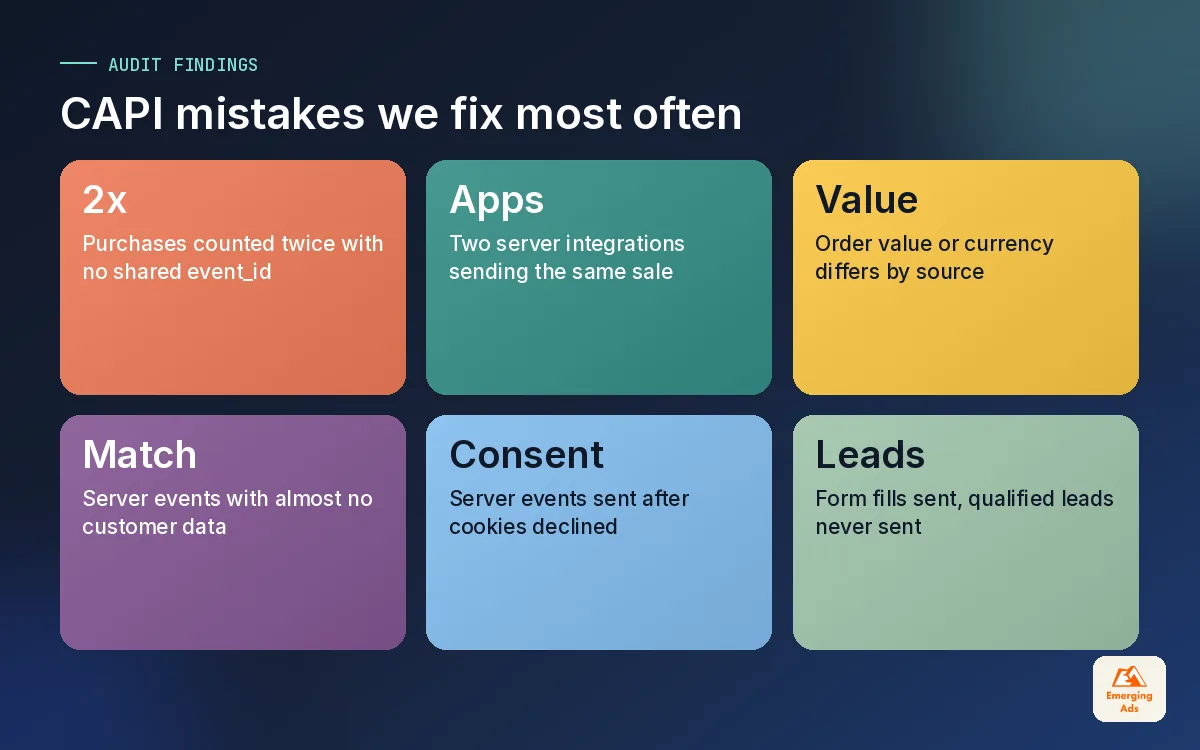
These are the problems we find most often during a Facebook ads audit. Most are quick to fix once spotted, and several can quietly distort results for months.
- Double counting purchases. Missing or mismatched event_id between Pixel and server. Reported ROAS looks great and nobody can find the extra revenue.
- Two integrations running at once. A Shopify app and a GTM build both send server events, so the same sale arrives three or four times.
- Wrong value or currency. Server events send order value including tax and shipping while the Pixel sends subtotal, or the currency code is missing.
- Thin customer data. Server events carry only IP and user agent, so match quality stays low and attribution suffers.
- Ignoring consent. Server events keep flowing for visitors who declined marketing cookies. This is a compliance problem, not a tracking win.
- Lead events with no follow-up. Lead-gen accounts send the form fill but never the qualified lead, so Meta optimises for cheap forms instead of real customers.
For stores, we often pair the tracking fix with checkout work, because a clean purchase event is easier to trust when the checkout itself is not leaking. That is where Shopify conversion optimisation and tracking tend to overlap.
08What better signal changes in your Meta results
Clients understandably want to know what happens after the Conversions API is fixed. We are careful not to promise specific numbers, because every account is different, but the pattern we see is consistent.
| What changes | What you usually notice | Timeframe |
|---|---|---|
| Reported conversions | Closer to what your store or CRM recorded | Days |
| Attribution | More sales linked to the ads that drove them | Days to weeks |
| Optimisation | Delivery shifts toward people more likely to convert | Weeks |
| Scaling | More confidence raising budgets on accurate numbers | Weeks to months |
Two warnings. First, if your old setup was double counting, fixing it will make reported results look worse overnight, even though real sales have not changed. Tell your finance team before it happens. Second, give campaigns time to adjust to the new signal before you judge them or make big structural changes.
Better tracking also opens up better strategy. Once signal is solid, testing broader audiences, Advantage+ campaigns and value-based optimisation becomes far more reliable, which is why we treat tracking as the first step in any Meta ads management engagement. Ecommerce brands see it most clearly in catalogue and retargeting performance, a big part of our Meta ads for ecommerce work, while lead businesses notice it in lead quality from Meta lead generation ads.
09Where to go from here
If your Meta account feels unpredictable, start with the tracking before you touch creative or budgets. Check that Pixel and Conversions API both fire, that they deduplicate, that purchases and leads carry good customer information, and that consent is respected. That short list fixes more accounts than any bidding trick.
You can see how tracking connects to the rest of what we do on our services page, or read more tracking guides on the whyemergingads.com homepage. For the wider question of how much credit Meta deserves compared with Google and email, our main site covers what attribution modelling costs and involves.
Frequently asked questions
Straight answers to what clients ask us most about meta conversions api.
What is the Meta Conversions API?
Do I still need the Meta Pixel if I use the Conversions API?
How does Meta deduplicate Pixel and Conversions API events?
What is a good event match quality?
Is the Facebook Conversions API the same as the Meta Conversions API?
How do I set up the Meta Conversions API on Shopify?
Does the Conversions API track users who decline cookies?
How long before the Conversions API improves my results?
Why did my Meta conversions drop after fixing CAPI?
Can I send CRM or offline events through the Conversions API?
Do I need a developer to set up the Meta Conversions API?
Is Meta optimising on half of your real conversions?
We will check your Pixel, Conversions API, deduplication and match quality, then show you exactly what Meta is missing and how to fix it.
Book your free audit