The GTM Data Layer: A Practical Guide We Hand to New Clients
Most broken tracking we inherit is not a GTM problem at all. It is a missing data layer. This is how we plan, write and test one with a client’s developers, without turning it into a six-month project.

Key takeaways
- The GTM data layer is a JavaScript array your site fills with facts, so tags read clean data instead of guessing from the page.
- Scraping CSS selectors and button text works until the next redesign. A data layer survives redesigns because it does not depend on the look of the page.
- A good spec lists every event, when it fires, each key with an example value, and who owns it. Developers can build that without a meeting.
- Keep names consistent, clear the ecommerce object before each push, and never put raw personal data into the data layer.
- Version the spec like code, test every release in preview mode, and give one person the job of saying yes or no to changes.
01What the GTM data layer actually is
The GTM data layer is a JavaScript array called dataLayer that sits on your website. Your site pushes facts into it: this page is a product page, this user is logged in, this form was submitted, this order was worth this much. Google Tag Manager reads those facts and passes them to your tags. That is the whole idea. It is a shared notice board between your website and your marketing tools.
Without it, GTM has to work things out for itself. It looks at URLs, CSS classes, button text and bits of HTML, and makes its best guess. That can work for a while. It is also why so many founders tell us their tracking “just stopped” after a website refresh that nobody thought would touch analytics.
If you are new to how containers, tags, triggers and variables fit together, read our Google Tag Manager guide first. This post goes one layer deeper, into the data your tags depend on.
How a push works
A push is a small line of code your site runs when something happens, for example dataLayer.push({event: 'lead_submit', form_name: 'quote_request'}). The event key tells GTM that something happened, and a Custom Event trigger can listen for it. The other keys are data. In GTM you create Data Layer Variables to read them, then use those variables in tags and triggers.
window.dataLayer = window.dataLayer || []; and push page-level data straight after. Anything pushed before GTM loads is still read, but a site that overwrites the array later wipes out what GTM already has.02Why scraping the page breaks your tracking
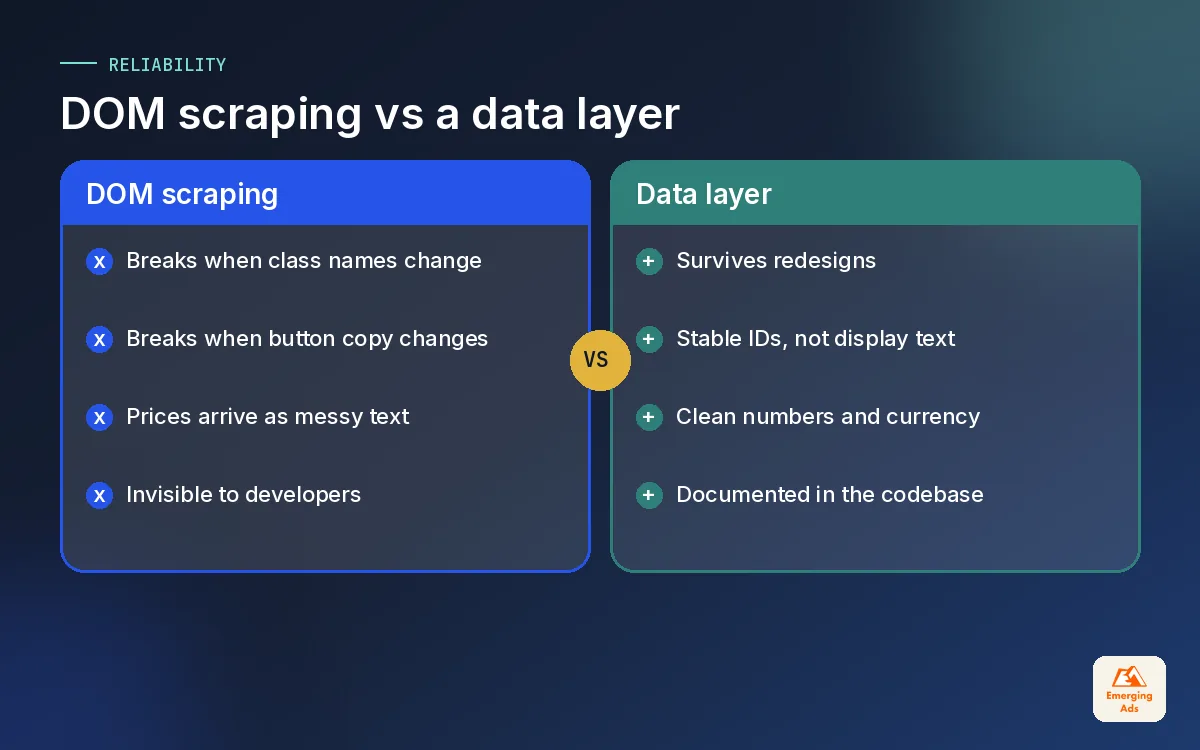
Most containers we audit rely on what is called DOM scraping: pulling values out of the page itself. A tag reads the price from a span with a certain class, or a trigger fires when someone clicks a button whose text is “Get a quote”. It is quick to set up, which is why agencies and freelancers reach for it. It is also fragile.
- A redesign changes class names. The price selector now returns nothing, and revenue in every platform quietly drops to zero.
- Copy changes break triggers. Marketing renames “Get a quote” to “Book a call” and lead tracking stops the same afternoon.
- Translations multiply the problem. A site in three languages needs three versions of every text-based trigger.
- Values are messy. Scraped prices come with currency symbols, spaces and commas, so they arrive as text rather than numbers.
- Nobody knows it exists. Developers cannot protect tracking they cannot see in the code.
On one lead-generation site we took over, the form tracking relied on a thank you message appearing inside a particular div. A developer moved the message into a pop-up. For five weeks the Google Ads account optimised against almost no conversions, and nobody noticed until cost per lead had climbed sharply. A single data layer push on successful submission would have survived the change without anyone touching GTM.
03Writing a GTM data layer spec developers can build
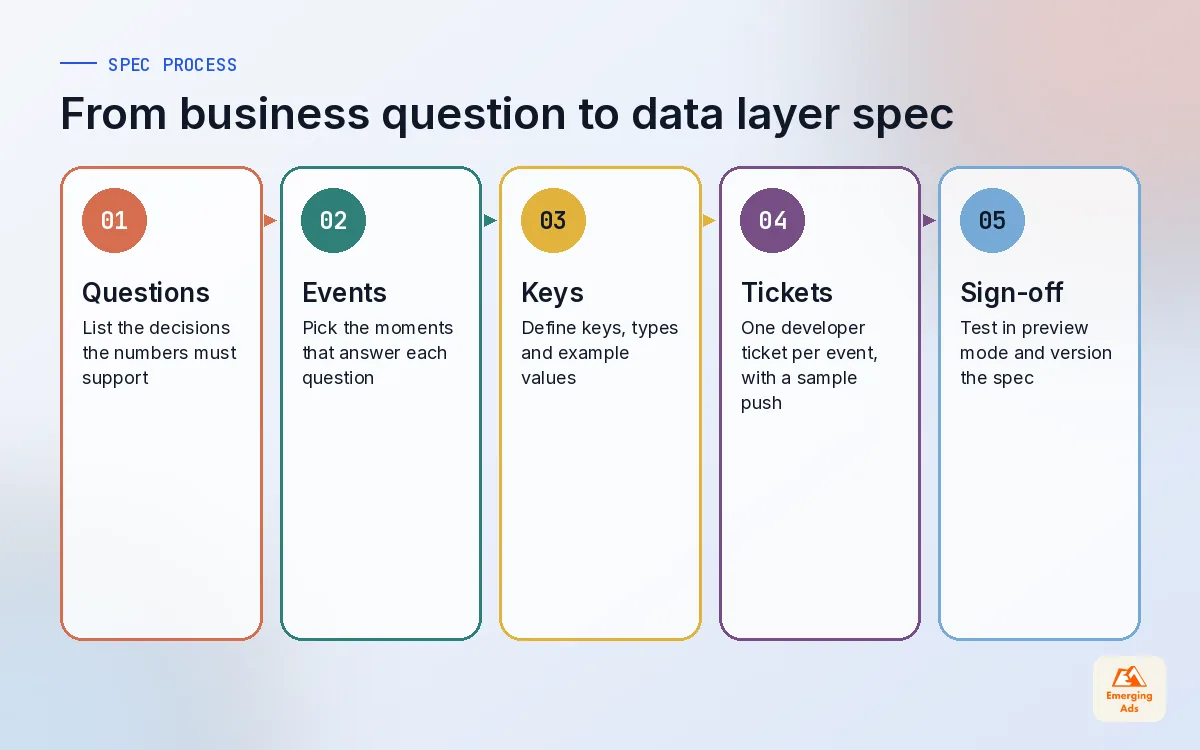
The spec is the most valuable document in any tracking project, and the one most often skipped. It is a plain list of what the site should push, when, and with which keys. A good spec lets a developer build without a meeting, and lets anyone audit the build later.
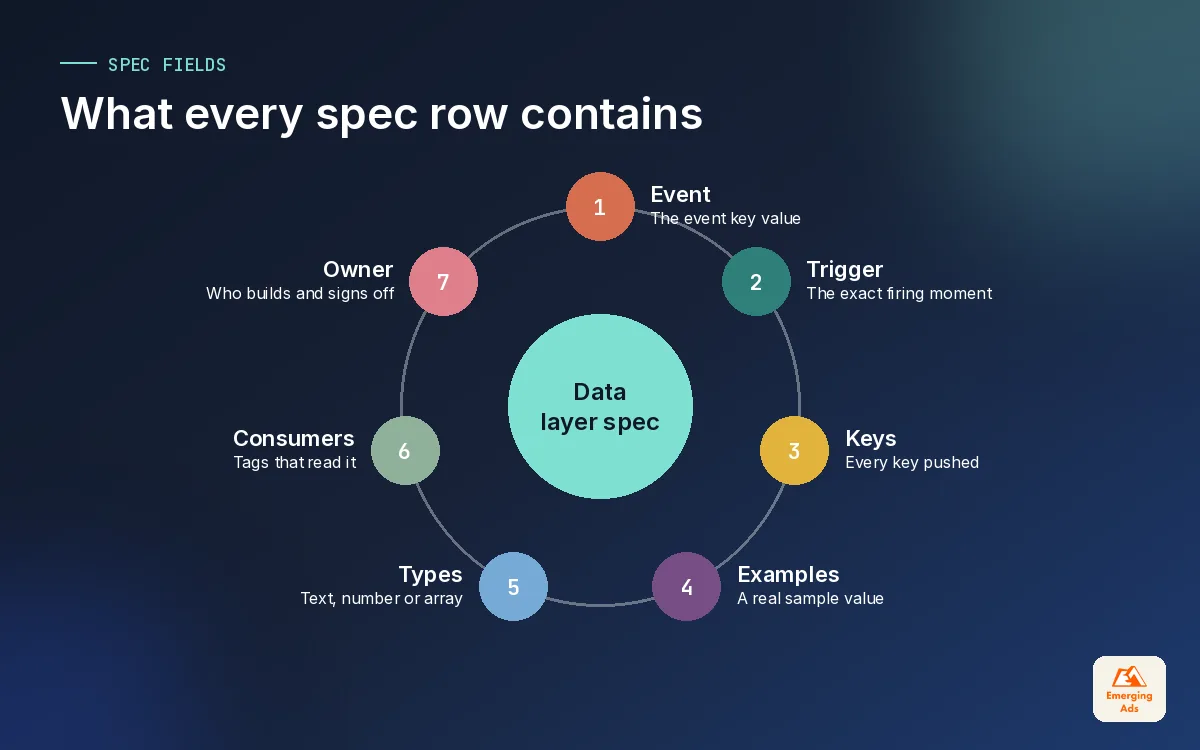
Ours lives in a shared spreadsheet with one row per event. These are the columns we use:
| Column | What goes in it | Example |
|---|---|---|
| Event name | The value of the event key | lead_submit |
| Fires when | The exact moment, in plain words | Form passes validation and the server confirms |
| Keys | Every key pushed with the event | form_name, form_location, lead_type |
| Example values | A real example for each key | quote_request, footer, residential |
| Data type | Text, number, true or false, array | Text |
| Pages | Where the event can fire | All pages with the quote form |
| Used by | Which tags read it | GA4, Google Ads, Meta, LinkedIn |
| Owner and status | Who builds it and where it stands | Dev team, built, tested 12 Oct |
Start from the questions, not the tags
We never begin a spec by asking which tags the client has. We ask what decisions they need to make. A SaaS founder wants to know which channels bring trials that convert to paid. A clinic wants to know which ads bring booked appointments. The events follow from those questions, and anything that does not serve a question stays out. Specs that try to track everything never get built.
Keep the first version small
A first spec of eight to fifteen events is plenty for most businesses. Page data, the main conversion, the key micro-conversions, and ecommerce events if you sell online. You can add more once the first release is live and trusted. Our GTM setup service always starts with this short spec, because it gets tracking live in weeks rather than months.
04Naming and structure rules that save you later
Naming feels like a small thing until you are looking at a GA4 report with formSubmit, form_submit and Form Submit side by side, each holding a third of your leads. Agree the rules before the first push and write them at the top of the spec.
| Rule | Do | Avoid |
|---|---|---|
| Case | snake_case everywhere: form_name | Mixing formName, FormName and form-name |
| Event names | object_action: lead_submit, video_start | Vague names like click or event1 |
| Values | Stable IDs: plan_pro_annual | Display text that marketing may rewrite |
| Numbers | Plain numbers: 49.99 | Text with symbols: “AED 49.99” |
| Empty values | Leave the key out, or send null on purpose | Sending “undefined” as a text string |
| Platform names | GA4 recommended names where they exist | Inventing a new name for purchase |
Flat or nested?
For most keys we keep the structure flat, because flat keys are easier to read in GTM and easier for developers to get right. We nest only where there is a natural group, such as user or ecommerce. GTM merges nested objects across pushes, which is useful, but it is also why stale values can hang around. That leads straight to the next rule.
05The ecommerce object and why you clear it
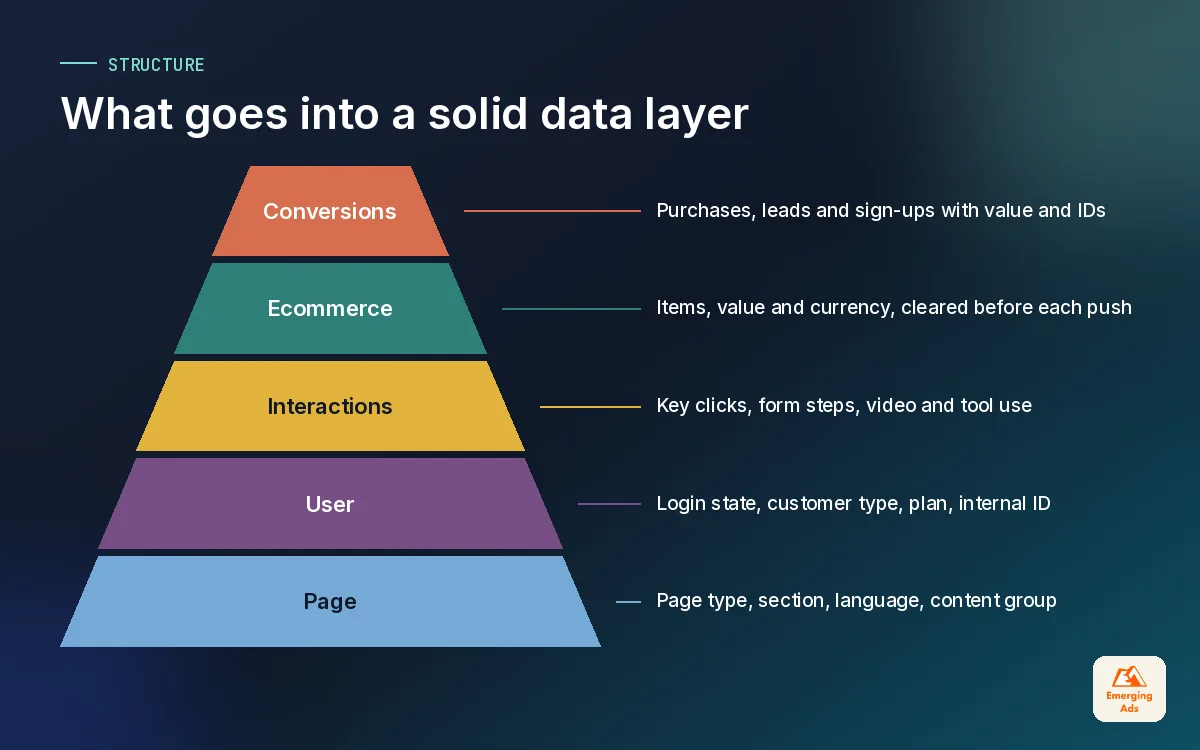
If you sell online, the ecommerce object will be the busiest part of your GTM data layer. It carries the items array, the value, the currency and the transaction ID that GA4, Google Ads and Meta all rely on. The event names and parameters should follow GA4’s recommended format, which we cover in detail in our GA4 ecommerce tracking guide.
The rule that catches most teams out is clearing. Because GTM merges pushes into one data model, an items array from a view_item push can still be sitting there when add_to_cart fires. The result is products that appear in the wrong event, or item counts that make no sense. The fix is simple: push {ecommerce: null} immediately before every new ecommerce event.
- Push
{ecommerce: null}to clear the previous object. - Push the new event with its full ecommerce object, including items, value and currency.
- In GTM, read the values with Data Layer Variables pointing at keys like ecommerce.value.
- Check in preview mode that each event shows only its own items.
The same clean object feeds your ad platforms. When we set up Meta Pixel tracking, the Pixel and the Conversions API read the same value, currency and event ID from the data layer, which is exactly what deduplication needs.
06User and page data, without the privacy mistakes
Beyond events, a good data layer describes the page and the visitor on every load. This is the context that turns a flat pageview into something you can segment.
- Page data: page_type (home, category, product, article, checkout), content group, language and site section.
- User data: login status, customer type (new or returning), plan or tier, and an internal user ID if you have one.
- Business data: store or branch, region, and experiment or variant name if you run tests.
Personal data rules
Never push raw email addresses, phone numbers or names into the data layer as plain text. Any script on the page can read it, including third-party tags you did not approve. Where a platform needs customer data for matching, such as Google Ads enhanced conversions, it should be hashed or handled server-side, and only after consent. Internal user IDs are fine for analytics, provided they cannot identify someone on their own.
This page and user context is also what makes deeper analysis possible later. Clients who move into Mixpanel product analytics or session tools reuse the same keys, so the naming work pays for itself twice.
07Pushing events on single-page apps
Single-page apps built in React, Vue or similar frameworks change what the visitor sees without loading a new page. GTM’s normal page view trigger fires once, on the first load, and then goes quiet. Without extra work, a visitor can move through five screens and GA4 records a single pageview.
There are two ways to handle it. GTM has a History Change trigger that fires when the URL changes through the browser history, and it can work for simple sites. For anything where reporting matters, we prefer the app itself to push a virtual page event on every route change, with fresh page data, once the new screen has rendered.
| Approach | Good for | Watch out for |
|---|---|---|
| History Change trigger | Simple SPAs and quick fixes | Fires before new content loads, so page data can be stale |
| App pushes a page event | Most production apps | Needs developer time and a clear spec row |
| Both at once | Nothing | Double pageviews and inflated engagement |
SPAs also need the page-level keys reset on each route change, or the page_type from the previous screen follows the visitor around. We see this constantly on SaaS accounts, where the marketing site is a normal website and the app behind the login is a SPA with its own tracking rules.
08Testing the data layer and versioning the spec
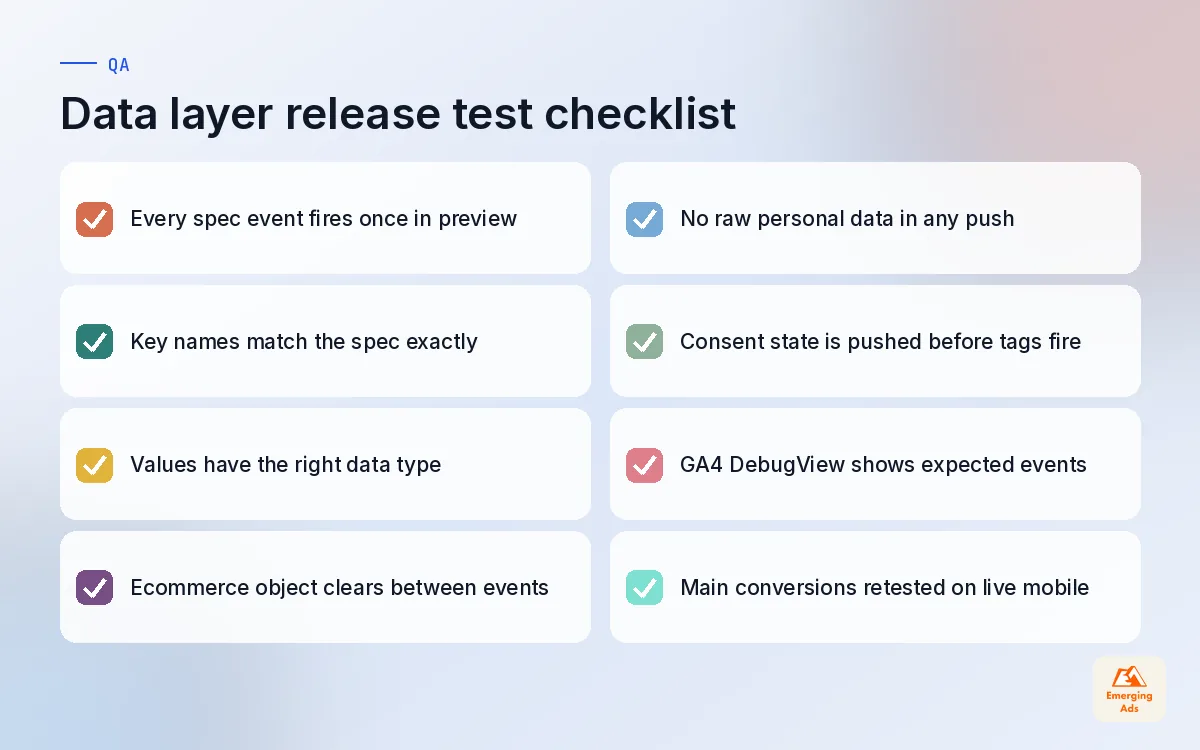
A data layer that has not been tested is a guess. We test every release in GTM preview mode, which shows each push in order, the full data model at that moment, and which tags fired or did not.
Our test routine for each release
- Open GTM preview mode on the staging site and walk through every event in the spec.
- For each push, compare keys and values against the spec row. Check data types, not just presence.
- Confirm the ecommerce object is cleared between events.
- Check GA4 DebugView and each ad platform’s test tool for the events that feed them.
- Repeat the main conversions on the live site after release, on mobile as well as desktop.
Treat the spec like code
Give the spec a version number and a change log. When a developer adds a key, the spec changes first, then the code, then GTM. When a key is removed, note which tags used it. Keep GTM container versions named to match, so “v1.4 add lead_type” in the spec lines up with a container version of the same name. Six months later, when someone asks why a report changed, you will have the answer in two minutes.
For containers that have grown messy over years of agencies coming and going, our Google Tag Manager solutions team rebuilds them around a documented data layer and removes the scraped tags one by one.
09Working with developers without the friction
Most data layer projects stall between marketing and development. Marketing asks for “tracking on everything”. Developers ask what that means and get a list of tag names. Nobody owns it, and months pass. The fix is mostly about how you ask.
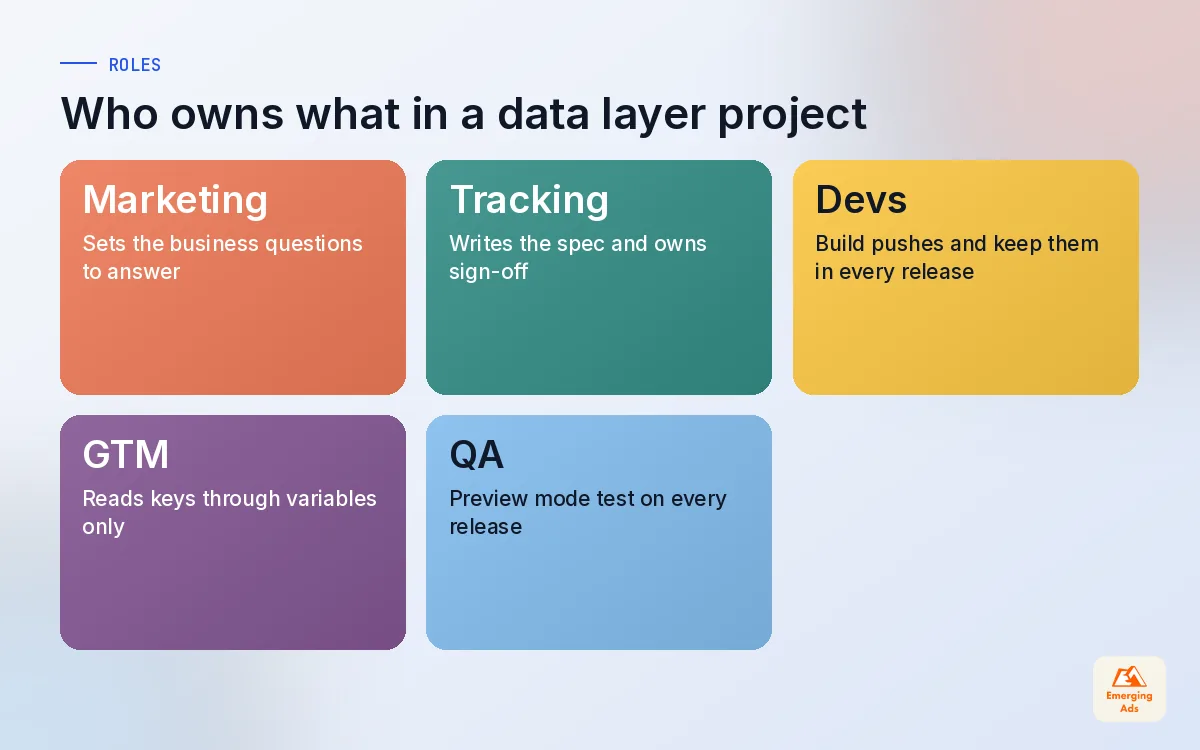
- Write tickets developers recognise. One ticket per event, with the spec row pasted in and an example push.
- Explain the why once. A short note on which business decision each event supports makes prioritisation easier.
- Agree a definition of done. Built, pushed on staging, checked in preview mode, signed off by the tracking owner.
- Put tracking in the release checklist. Any change to forms, checkout or navigation triggers a quick data layer check.
- Name one owner. Someone who can say yes or no to new keys, so the spec does not drift.
The best data layer is boring: every developer knows where it is, every push matches the spec, and nobody talks about it.
When the site itself needs work to support this, our website design and development team can build the pushes alongside the tracking team, which removes the handover entirely. Many clients then use the same clean data to power heatmap analysis and GA4 reporting, and route key conversions through a full conversion tracking setup. If you want to see how this fits with GA4 configuration, our GA4 setup service covers the analytics side, and you can browse all our services or return to the whyemergingads.com homepage for the rest of this series.
Frequently asked questions
Straight answers to what clients ask us most about gtm data layer.
What is the GTM data layer?
Do I need a data layer if GTM already works?
Who should write the data layer spec?
How many events should a first data layer have?
What is the difference between a data layer variable and a DOM variable?
Why should I push ecommerce null before each event?
Can I put email addresses in the data layer?
How do I track a single-page app with GTM?
How do I test the data layer?
How long does a data layer project take?
What happens to the data layer when the website is rebuilt?
Is your tracking one website update away from breaking?
We will review your GTM container and data layer, flag every tag that relies on page scraping, and hand you a spec your developers can build from.
Book your free audit